Showing posts with label Cubix Cube 2. Show all posts

Thursday, January 14, 2016

[ROM] Flyme OS 4.5.4R for Cherry Mobile Cubix Cube 2

[ROM] Flyme OS 4.5.4R for Cherry Mobile Cubix Cube 2
Flyme ROM Screenshot 1

Flyme ROM Screenshot 2

Flyme ROM Screenshot 3

Flyme ROM Screenshot 4

DISCLAIMER: I DO NOT OWN THIS ROM. I ONLY PORTED IT IN OUR DEVICE. I am NOT Responsible to any damage that might happen to your device after flashing this ROM. Make sure to have a Nandroid Backup of your Stock ROM before flashing. Flash this on your own risks!

FEATURE : 
  • GOOD BATTERY BACK UP
  • GOOD CAMERA QUALITY 
  • BEAUTIFUL UI
  • THEMES INCLUDED
  • STABLE AS DAILY USE


  • ETC Explore With Your Self
PHILZ ONLY
Reboot to Recovery
  • Wipe Factory Reset
  • Wipe Cache
  • Wipe Dalvik Cache 
Install zip
  • Flash Rom
  • Flash PATCH
  • Flash Gapps
  • DONE
  • ENJOY..
LINK 
ROM
Flyme 4.5.4R: Click Here

PatchClick Here

GappsClick Here


Bugs
Can't Play video in fb app(download older fb version)
May mag p-prompt ng internal is running low kada boot. ok niyo lng
if animation is slow. go to settings, accessibility, developer options, and change animation to.5x
If some minor bugs, just do a reboot, (download rebooter app recommend ko lng) 

°°° CREDiTS °°°
  • Selfish Sopnil 
  • Maximum Team
  • Jermeiah ( TESTER )
  • IPT™ 
  • Carl Baluran
  • Gio Olorvida
  • Joseph Paraiso-> tester
  • Cherry Mobile Cubix Cube 2 Tech-Support, Dev, ROMs

[ROM] Lollifox v1.5 for Cherry Mobile Cubix Cube 2

[ROM] Lollifox v1.5 for Cherry Mobile Cubix Cube 2


Lollifox Screenshot 1

Lollifox Screenshot 2

Lollifox Screenshot 3

Lollifox Screenshot 4

Lollifox Screenshot 5

Lollifox Screenshot 6


[ROM] LolliFox v1.5.0 Patch From 1.4.0 to 1.5.0 

Disclaimer: I am not Responsible to any or what may happen to your device.Make Sure you have a full back up of you stock rom (Current rom)The ROM is fully tested and Currently on running on my device.


Features:
  • Tinted statusbar - √
  • Dyanamic statusbar and navbar - √
  • L style recent app view - √
  • L style inCallUi - √
  • L style dialer - √
  • L style contacts - √
  • L style messaging. - √
  • L style settings - √
  • L style radio - √
  • L style browser - √
  • L style SystemUI - √
  • L style Camera (CM12) - √
  • L style keyguard - √
  • L style gallery - √
  • L style file manager - √
  • L style downloads - √
  • L style calender - √
  • L style clock app - √
  • L style AudioFX (CM12) - √
  • L style torch app - √


Bugs: 
  • No Serious Bugs found yet - X 
  • Tell me - X


Installation:

CWM:
  • Reboot To Recovery 
  • - Wipe all Data 
  • - Wipe Cache 
  • - Wipe Dalvik CacheInstall Zip 
  • - ROM 
  • - Install Patch
  • - Dap 
  • - KingUserReboot ! & Enjoy

LolliFox : 

Patch 2 : 

Dolby Atmost :

KingUser :


Credits:
  • FMD TEAM
  • AndroidCribs.Com
  • Yow Mike - For Lollifox 1.4.0 Final
  • Maximum Rom
  • Bot man
  • Akashi Steve Kun
  • Carl Baluran 
  • Giovanni Olorvida
  • Cherry Mobile Cubix Cube 2 Tech-Support, Dev, ROMs

[ROM] Doogee Valencia ROM for CherryMobile Cubix Cube 2

[ROM] Doogee Valencia ROM for CherryMobile Cubix Cube 2

Doogee Valencia Rom Screenshot 1

Doogee Valencia Rom Screenshot 2

Doogee Valencia Rom Screenshot 3

Doogee Valencia Rom Screenshot 4

Doogee Valencia Rom Screenshot 5


DISCLAIMER
 Your warranty is now void.
*
* I am not responsible for bricked devices, dead SD cards,
* thermonuclear war, or you getting fired because the alarm app failed. Please
* do some research if you have any concerns about features included in this ROM
* before flashing it! YOU are choosing to make these modifications, and if
* you point the finger at me for messing up your device, I will laugh at you.


DOOGEE Valencia2 ROM features:
  • Dual SIM
  • Double Tap to Wake
  • Latest Valencia ROM
  • Doogee Valencia2 Y100 Framework and other System Apps
  • MIUI PRO Boot logo & Bootanimation
  • Debloated
  • 14MP Rear Camera
  • 8MP Front Camera
  • Dual 3G on Data
  • 3 finger slidedown for Screeh shot
  • Google Keyboard
  • Built in Xperia Walkman
  • Xperia Walkman Widget
  • Pre-installed Latest Greenify
  • Latest Titanium Back Up
  • Latest Root Explorer
  • Pre-installed Universal Init. D support.apk
  • Built in DOLBY ATMOS
  • Built in ViPER4Android
  • Built in Rebooter
  • Applemint Font
  • Odex
  • Zipalign
  • No tweaks
  • OTG Working
  • Busybox Installed ( Not latest, update it in Playstore )

Screenshots:
- Already Posted

LINK :
ROM

Patch

Patch 2 

SuperSU ROOT
Link:


Instructions:
1. DOWNLOAD ROM, PATCH, Super SU
2. Save to Internal
3. Reboot to recovery
4. Wipe
5. Flash ROM
6. Flash PATCH 1,
7. Flash PATCH 2.  
8. Flash SUperSU
9. Reboot


Valencia VERY USEFUL TWEAKS:
Link:


BUGS:
- MINSAN NASA USER ^_^


CREDITS :
  • COSMOS ONE - SOURCE ROM
  • MAXIMUM ROM 
  • ETC.
  • GOOGLE
  • Carl Baluran
  • Gio Olorvida
  • Cherry Mobile Cubix Cube 2 Tech-Support, Dev, ROMs


#‎Maximum™
#‎MaximizingAndroid

Tuesday, December 29, 2015

[ROM] Lewa OS 6 for Cherry Mobile Cubix Cube 2

[ROM] Lewa OS 6 for Cherry Mobile Cubix Cube 2

LEWA ROM FOR CC2 SCREENSHOT 1

LEWA ROM FOR CC2 SCREENSHOT 2

LEWA ROM FOR CC2 SCREENSHOT 3

LEWA ROM FOR CC2 SCREENSHOT 4

LEWA ROM FOR CC2 SCREENSHOT 5

LEWA ROM FOR CC2 SCREENSHOT 6

FEATURES:
Real Lewa OS
Deodexed
Not Rooted, (flash superSU)
Bugs, tell me
Instruction:
Download
Put to storage
Reboot to recovery
Wipe
Flash ROM
Reboot
ROM Link -> Click Here

Credits:
Gio Olorvida for porting
En.miui.com (for the rom)
Maximum Porting Team
Lynx Porting Team
Unknown Porting Team

Sunday, December 13, 2015

[ROM] Samsung S6 Dual for CM CUBIX CUBE 2

[ROM] Samsung S6 Dual for CM CUBIX CUBE 2

samsung-galaxy-s6 screenshot 1

samsung-galaxy-s6 screenshot 2

samsung-galaxy-s6 screenshot 3

samsung-galaxy-s6 screenshot 4

samsung-galaxy-s6 screenshot 5

samsung-galaxy-s6 screenshot 6

samsung-galaxy-s6 screenshot 7


1. ROM LINK - Click Here
2. UPDATE 1 - Click Here
3. UPDATE 2 - Click Here
4. PATCH - Click Here

Flashing Instructions:
1. Download all for links
2. Copy 4 files to Internal Storage3. Reboot to Recovery (TWRP, PHILZ)
4. Wipe System, Data, Cache, Dalvik Cache or Clean to Install New ROM
5. For TWRP, after wiping Go back to Home and go to Mount. Uncheck System, Data
6. For Philz, Go to Install Zip using free browse mode and go to this directory, /Root/Data/Media
7. Flash ROM, UPDATE 1, UPDATE 2, PATCH
8. Reboot
9. Wait and Done

Credits:
Gio Sanoria Olorvida for porting
NPT
MPT
LPTCarl Baluran
CC2 ROM Testers 

[ROM]Pussy Fap v4 - Beast Rom for CM Cubix Cube 2

[ROM]Pussy Fap v4 - Beast Rom for Cubix Cube 2


Pussy Fap v4 Screenshot 1

Pussy Fap v4 Screenshot 2

Pussy Fap v4 Screenshot 3

Pussy Fap v4 Screenshot 4

Pussy Fap v4 Screenshot 5

Pussy Fap v4 Screenshot 6

 - Always give CREDITS to us!
- The rom is already rooted so DO NOT ROOT IT AGAIN!
- To Enable Weather you must ENABLE first the GPS and set it to High Accuracy
- The Bugs that we know is already stated in Changelogs section so don't complain if your camera is not connected or no phone storage!

Change Logs:

• New Theme Color
• Added Dolby Atmos
• Added Battery Bar Options
• Added Date and Clock Options
• Added Font Style Options
• Added Navigation Bar Options
• Added BeamKAT Data Traffic Style
• Added Shake to Clear Ram
• Added Double Tap to Sleep Gesture
• Added Parallax Recent Apps
• Added Notification Counts
• Added Gestures Anywhere Options
• Added CPU Time in State Settings
• Added Ad Blocker
• Added System App Remover
• Added Extra Info Settings
• Added Carrier Label in Statusbar
• Added Superuser
• Added New Wallpaper Pack App
• Added New Battery Styles
• Added New Weather Options
• Added New Expandable Volume Option
• Added Setup Wizard App
• Changing Platlogo to MarshMallow
• Removed Notification Animations
• Removed Framework Animations
• Removed Seeder App
• Removed Init.D Tweaks Options
• Fixed Inverted Screenshot in 180 Rotation Devices
• Fixed Statusbar Icons Tint(Not All)
• Fixed Dynamic System Bars(Supported All Devices)
• Fixed Heads Up Notificatio
• Revert back some built-in Features
• Debloat Rom for Better Performance
• Making more Lollipop Like Style
• Improving Rom Performance


Bug

• Statusbar CarrierLabel Color Picker Not Working
• Navigationbar tint have conflicts with Navigationbar Options
• Music force closes sometimes but doesn't affect the app


How to install?

* Boot to recovery(twrp,philz) 
-(BIG NO to stock recovery)
* Wipe factory reset
* Wipe Cache
* Wipe Calvik Cache
* Install Pussy fap v4
* Install Patch
* Reboot

  • PussyFap v4 Link :
      Click Here


Note:
If you can't open playstore app or google sync error, just clear data of your GOOGLE PLAYSTORE AND GOOGLE PLAY SERVICE. (Settings/app/all/GOOGLE PLAY SERVICE/MANAGE APP/CLEAR DATA)

Credits:
Gio Sanoria Olorvida for porting
Team Pussy
Josiah Tingzon
Carl Baluran - Porter for Infinix Pure
Glen Junior - Screenshot
Mark Wane Cañon
Maximum Rom
X200 PORTING TEAM™
X330 PORTING TEAM™
#‎Maximizing™
Enjoy Porting Team X330 ^^

Tuesday, December 8, 2015

[ROM] Stay OS v3 CM Cubix Cube 2

[ROM] Stay OS v3 CM Cubix Cube 2
Stay OS Screenshot 1

Stay OS Screenshot 2

Stay OS Screenshot 3

Stay OS Screenshot 4

Stay OS Screenshot 5

Stay OS Screenshot 6

Stay OS Screenshot 7

Stay OS Screenshot 8


Disclaimer: I am not Responsible to any or what may happen to your device.
Make Sure you have a full back up of you stock rom (Current rom)
The ROM is fully tested and Currently on running on my device.

Features:
  • enable / Disable Navbar- Statusbar
  • enable / Disabling the operator's name
  • Moves Clock on the right or left
  • Setting Color hour
  • Battery Icon
  • enable / Disable the battery icon
  • enable / Disabling the percentage of battery level
  • Monitor Internet data
  • Set Color monitor Data
  • Colors Dynamically set colors at certain hours
  • Gesture
  • Features Gestures anywhere
  • Application Circular
  • Level Visibility
  • size Quick keys
  • Recents Panel
  • enable / Disable button deletion
  • enable / Disabling of the memory
  • the Location deletion button (right or left)
  • Screen Notifications
  • Notification Weather
  • This Setting fast
  • Selection Lot and location shortcut
  • Press Long on the icon to enter the settings
  • as Occupying music with a single click
  • Record Sound and the screen easily
  • Maximize RAM used with a single click
  • Slider Screen brightness

HOW TO INSTALL:
Boot to recovery(cwm, ctr, philz, twrp)
Wipe Data
Wipe Cache
Wipe Dalvik
- Install Stay OS v3- Install Patch
- Install Bootlogo Patch
- Install Playstore Fix- Install Camera Fix
Reboot
Enjoy!!!

  • STAY OS v3:
  • PATCH:


NOTE:
After first boot try to open PlayStore to check if it is working(must be connected to wifi or data connection)
Rom is already Pre-rooted
Q&A

  • Q: Bakit po yung name ng device sa about phone ? Makaka damage po ba to sa phone ko ?
  • A: Wala po yang Damage yan dyan kung gusto mo palitan Goto Root explorer Root/system/build.prop Palitan nyo nalang po tnx

CREDITS:
Himura05
Stay OS Team
Project Cyanogen MOD
Slim Team
Carbon Team
Omni TeamMaximum RomMaximum Dev/Team
Infinix Porting Team™
Knight Owls Porting Assassins
Carl BaluranGio Sanoria Olorvida

Monday, November 30, 2015

[TUT] how to fix bootloop on Cherry Mobile Cubix Cube 2

This tutorial is able to help you oh how to fix bootloop on CM Cubix Cube 2

Fix Bootloop of CM Cubix Cube 2


Requirements:
PC
USB Cable

Download Links:
Mediatek VCOM Drivers
Cherry Mobile Cubix Cube 2 Stockrom


 Instructions
1. Download all necessary files and Enable USB Debugging mode in your phone..
2. Install Drivers Mediatek VCOM Drivers
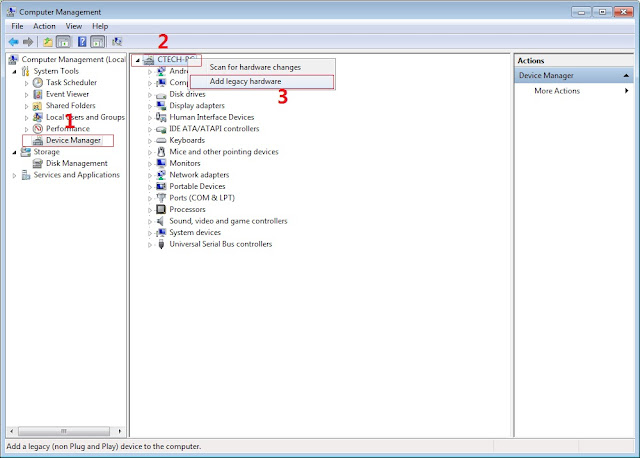
In Device Manager Right click on PC name(Right Side) and then click on Add legacy hardware as shown in image below.

SPFT Screenshot 1
Now in Add Hardware Wizard click on Next » Install the Hardware that i manually select from a list (Advanced) » Show All Devices » Next » Have a Disk, Now select the any inf file from where you extracted the downloaded VCOM driver package.

SPFT Screenshot 2

3.  Now Click on Next and select Install this driver software anyway and wait for finishing the process.

SPFT Screenshot 3

4.  After installation is finished then Restart your computer, That's it.
5. Open flash_tool.exe, click on the Download Tab
 Extract the downloaded Jiayu g6 stock rom to the new folder you created.
Click Flash Tool

6. Click Scatter-loading and browse for the scatter file (MT6592_Android_scatter)
7. For Bootloop only
 Make sure flashing mode is set to "Download Only" and check mark all except Preloader.
Note: If deadboot/hardbrick set "Download+Format" and check Preloader.
8. Click Download.
9. Turn off your phone, connect your phone to the PC and wait for the flashing to commence.
10. Green Circle image with check will show once flashing is completed. That's it!
11. Disconnect your phone in USB cord then open if still bootloop then try to factory reset in recovery settings. To go in recovery mode reboot your phone hold and press power on and volume up simultaneously until recovery mode appeared.


Credits:
Gio for rom
Cube Cubix2 group

Saturday, November 28, 2015

[ROM] [MAXIMUM] CyanogenMod 12.1 Stable version for Cubix Cube II

[ROM] [MAXIMUM] CyanogenMod 12.1 Stable version for Cubix Cube II

Cyanogenmod 12.1 cubix cube 2 screenshot 1

Cyanogenmod 12.1 cubix cube 2 screenshot 2

Cyanogenmod 12.1 cubix cube 2 screenshot 3

Cyanogenmod 12.1 cubix cube 2 screenshot 4

Cyanogenmod 12.1 cubix cube 2 screenshot 5

Cyanogenmod 12.1 cubix cube 2 screenshot 6

  • Whats New?
  • Real CM12.1 ROM
  • Smooth + Beast Mode ROM
  • Offline Charging Works
  • Hotspot Works
  • Video Recording in Stock Camera Working
  • FM Radio Working
  • Rooted(check USB Debugging)
Features:
  • The ability to control every part of the Mod.
  • Simplified access for new users/not willing to flash the Mod through the recovery.
  • Booster Mode for better performance and battery life.
  • Full memory management/Better multitasking.
  • Linux kernel tweaks and improvements for better performance and battery life.
  • Less lags for gamers.- Entropy generator engine used to reduce lags.
  • Zipalign apps in "/system" and apps in "/data" every 24 hours which result in less RAM usage.
  • Better thermal management and less overheating.
  • Sqlite optimizations and faster database access.
  • Increased SD Card read-ahead cache to 2048 KB for faster SD card read and write.
  • Build.prop tweaks and improvements.
  • Cleans log files and tombstones at every boot.
  • Many other tweaks for better performance and battery life!


--------------------------------How to Install? [MUST READ]-----------------------------

--------------------FLASH THIS ROM USING PHILZ RECOVERY--------------------------
Since we have a unit with no external sdcard, the philz recovery only detects the internal storage of our unit /data/media. Read instruction on "HOW TO FLASH THE ROM"to avoid any problems.
  1. -DOWNLOAD ROM "cm-12.1_Stable_Lynx.zip"
  2. -DOWNLOAD UPDATE PATCH "cm12.1_stable_v1_Cubix_II_patch.zip"
  3. -Put the ROM and UPDATE in internal storage
  4. -Reboot to "PHILZ RECOVERY"
  5. -Reboot to "PHILZ RECOVERY"
  6. -Reboot to "PHILZ RECOVERY"
  7. -Reboot to "PHILZ RECOVERY"
  8. -go to WIPE
  9. -Wipe Factory Reset
  10. -Wipe Dalvik-Cache/ART
  11. -Install zip /sdcard
  12. -Install  "cm-12.1_Stable_Lynx.zip" ROM First
  13. -(Disregard the errors when flashing ROM, don't worry ROM still works 100%)
  14. -After flashing ROM, Go back
  15. -Install "cm12.1_stable_v1_Cubix_II_patch.zip"
  16. -Wait untill Success
  17. -Reboot Phone
  18. -Wait 2-4 minutes.
  19. -Done! 

POST INSTALLATION INSTRUCTION
1.) Camera 
  • Go to stock camera app
  • Tap Next
  • Go to Settings (How? Swipe from Left Edge to Right)
  • Go to Resolution & Quality
  • Set Back Camera Video to 720p or 480p (note: don't try for 1080p or HD quality in recording, mag la-lag lng pag play mo)
  • Done
2.) How to Root
  • Go to Settings
  • GO to About Phone
  • Tap "Build Number" 4-5 times Until Developer Settings is enabled
  • Go Back
  • Swipe Down Until you see "Root Access" Tap it
  • Set it up according to your choice

FAQs
  • Sir wla ako makita sa Philz nung nag tap ako "install zip /sdcard"
  • - eto gawin mo: follow mo lng: 
  • -1.  tap "install zip"  
  • -2. tap "Choose zip Using Free Browse Mode" 
  • -3.  tap "Start Folder in /sdcard" 
  • -4.  go to "data/" 
  • -5.  go to "media/" 
  • -6.  (you should now be in the internal storage)  
  • -7. tap "Set current folder as default" 
  • -8. tap "Choose zip from /sdcard" 
  • -9. Locate where you store the ROM and PATCH 
  • -10. (Di mo parin na kita?) 
  • -11. tap "0" Folder 
  • -12. Locate where your ROM, PATCH is" 
  • -13. Flash ROM, PATCH 
  • -14. Reboot 
  • (NOTE: if touch is not working, use VOLUME BUTTONS UP & DOWN to navigate, and POWER BUTTON to select)
  •  
  • Nag Force Close Minsan ang Music
  • -It's Fine. Just re open the app
  • Nag s-skip yung kanta/Music
  • -Sa umpisa lng yan. after mga ilang kanta okay na yan. or Reboot Phone
  • Nag F-Force Close ung Camera pag nag palit ako ng Theme
  • - Restart Phone
  • Nag F-Force Close ang PlayStore pa minsan minsan
  • - Dahan2 lng kasi :D. re-open Play Store App
  • Nag break kami ng syota ko :'(
  • - Wala ako kasalanan haha

Download Link:


Credits: (Important Part)
  • Jonacx D Greyt For this Awesome ROM
  • Danilo Sarmiento Caballero
  • Carl Baluran
  • Gio Olorvida
  • MAXIMUM PORTING TEAM
  • SKK LYNX UNITED ADMIN
  • Lynx Porting Team
  • CyanogenMod
  • Google.com
  • Facebok.com
  • Source of this ROM
  • Tools for Porting This ROM
  • Other Developers Who contributed to this ROM
  • Sheena Tanael - Tester