Showing posts with label Firefly Mobile Intense Metal. Show all posts

Friday, November 20, 2015

[ROM] Cleankat v4.1 Firefly mobile Intense Metal (v05 based)

[ROM] Cleankat v4.1 Firefly mobile Intense Metal (v05 based)

CleanKat Screenshot

CleanKat Screenshot 2

CleanKat Screenshot 3


FLASH AT YOUR OWN RISK!

Your warranty is now void. I am not responsible for bricked devices,your girlfriend or wife got mad at you for using this rom, dead SD cards, thermonuclear war, or you getting fired because the alarm app failed.Please do some research if you have any concerns about features included in this Patch before flashing it! YOU are choosing to make these modifications, and if you point the finger at me for messing up your device, I will laugh at you. ALWAYS DO A BACKUP, BACKUP and LASTLY BACKUPS!

REMINDER! Please make sure to back your NVRAM folder or IMEI before Flashing this one!
How to backup your imei [CLICKHERE]

Flash it with your own RISK!!!

I am not responsible for any damage or soft/hard brick will happened to your device!
Rom Link:
Cleankat v4.1 (v05 based) by ryeduran 

Instruction:
download ROM
place it to ur sd card (root)
wipe data/cache
wipe cache
wipe dalvik cache
format system
install zip
reboot...

TO ROOT:
-download superSU
-go to CWM recovery
-install superSU.zip
-reboot

Credits to:
Cleankat Rom
Rye Duran
Sir Umang Leekha
 FF IM Admins
idol narwi3x

[ROM] PussyFap ROM Firefly Mobile Intense Metal(based onv14)

[ROM] PussyFap ROM Firefly mobile Intense Metal(based onv14)


PussyFap Rom Screenshot


REMINDER! Please make sure to back your NVRAM folder or IMEI before Flashing this one!
How to backup your imei [CLICKHERE]

Flash it with your own RISK!!!

I am not responsible for any damage or soft/hard brick will happened to your device!
Rom Link:


Instruction:
Downlaod PussyFAP ROM
Boot to recovery(cwm,philz)
wipe data, cache,dalvik cache,system
install zip from sdcard
locate PussyFap ROM
wait for completion
Reboot


Credits to:
-Lindjie Cabatuan
-Pussyfap Group
-to the owner

Thursday, November 19, 2015

How to root and Install Custom Recovery for Firefly Mobile Intense Metal

How to root and Install Custom Recovery for Firefly Mobile Intense Metal
Root and Install Custom Recovery for Firefly Mobile Intense Metal


Rooting:

1. Download KINGROOT apk

2. Install KINGROOT

3. Open and tap "ROOT" (yung bilog na green po)

4. Wait for the process to finish, may lalabas na ROOT at CHECK dun sa green na bilog. It means, rooted na...

You can use Root Checker app sa PS after nio magroot...


Install Custom Recovery

Requirements:
Rooted
Download:


Procedure:
Step 1:Install rashr_tool.apk

Step 2: Move the recovery.img in your SDCARD outside the folder which you can see easily.

Step 3: Open Rashr Tools Grant SuperSu
Click Recovery from Storage
Then choose Recovery.img Click OK

To boot into recovery mode manually, press volume up + volume down + power button

That's it! You can backup and install your desired custom rom now! ..


How to fix bootloop in Firefly Mobile Intense Metal via SPFT

How to fix bootloop in Firefly Mobile Intense Metal  via SPFT
fix bootloop in Firefly Mobile Intense Metal  via SPFT


This tutorial is able to help you oh how to fix bootloop and hardbrick in Firefly Mobile Intense Metal.
In case you don't have backup and installed custom recovery you can proceed in this procedure.

Requirements:
PC
USB Cable

Download Links:
Mediatek VCOM Drivers
FIREFLY INTENSE METAL Stock rom


 Instructions
1. Download all necessary files and Enable USB Debugging mode in your phone..
2. Install Drivers Mediatek VCOM Drivers
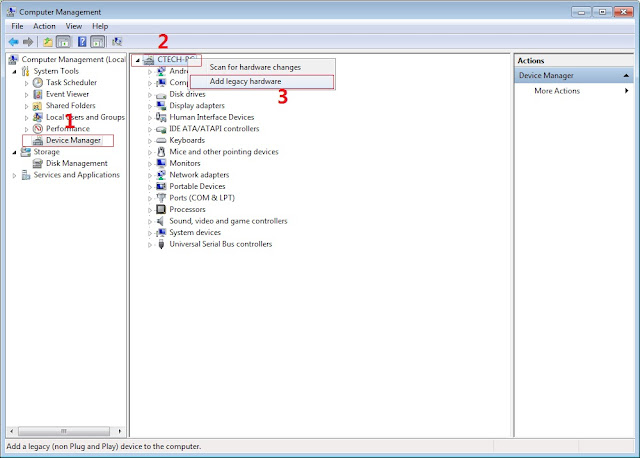
In Device Manager Right click on PC name(Right Side) and then click on Add legacy hardware as shown in image below.

SPFT Screenshot 1
Now in Add Hardware Wizard click on Next » Install the Hardware that i manually select from a list (Advanced) » Show All Devices » Next » Have a Disk, Now select the any inf file from where you extracted the downloaded VCOM driver package.

bootloop in firefly

3.  Now Click on Next and select Install this driver software anyway and wait for finishing the process.

SPFT Screenshot 3

4.  After installation is finished then Restart your computer, That's it.
5. Open flash_tool.exe, click on the Download Tab
 Extract the downloaded Firefly Intense Metal stock rom to the new folder you created.
SPFT Success Screenshot 4

6. Click Scatter-loading and browse for the scatter file (MT6582_Android_scatter)
7. For Bootloop only
 Make sure flashing mode is set to "Download Only" and check mark all except Preloader.
Note: If deadboot/hardbrick set "Download+Format" and check Preloader.
8. Click Download.
9. Turn off your phone, connect your phone to the PC and wait for the flashing to commence.
10. Green Circle image with check will show once flashing is completed. That's it!

SPFT Success Screenshot

11. Disconnect your phone in USB cord then open if still bootloop then try to factory reset in recovery settings. To go in recovery mode reboot your phone hold and press power on and volume up simultaneously until recovery mode appeared.

Credits:
Longine Ibanez
Firefly Intense Metal Group