Showing posts with label Cherry Mobile Flare 4. Show all posts

Thursday, May 19, 2016

[ROM] CYANOGENMOD 12.1 STABLE V3 PORTED TO CM FLARE 4

[ROM] CYANOGENMOD 12.1 STABLE V3 PORTED TO CM FLARE 4
CM 12.1 ROM ported to Flare 4

CM 12.1 ROM ported to Flare 4 Screenshot 2

CM 12.1 ROM ported to Flare 4 Screenshot 3

CM 12.1 ROM ported to Flare 4 Screenshot 4

CM 12.1 ROM ported to Flare 4 Screenshot 5


Bug(s)
FM Radio and Users
OTG (Use OTG helper)
Working
Stable Rills
Network Fixed
wi-fi
Bluetooth
No more Launcher Bug
Charging only fixed
etc..
cancelled all upcoming ROM projects for Flare 4:
Paranoid ROM
RR
Cm13
Miui 7
Full Flare 4 Mallows kernel and Firmware
FlymeOS
Amigio OS
DanOS
ZenUI
Galaxy S6 V2
IOS
AOKP(Dirty Unicorn)
Yurohpia
etc..

Instructions:
Flash via TWRP 3.0


Credits:
CyanogenMOD
Kali Linux
Github
Jonacx D Great
Jin X Dii
Danielle Bote
Maximum ROM
Bluflame4
Unknown.XD


Thursday, May 12, 2016

[ROM]Cyanogenmod 12.1 for CherryMobile Flare 4

Cyanogenmod 12.1 for CM Flare 4

cyanogenmod12.1 rom for CM Flare4

Third EditionDownload:Click Here Note:Flash at your own risk Installation Instructions:Boot to custom recovery wipe factory default/reset flash cm12.1 wipe cache and dalvik cache Credits:
Jonacx d great Maximum Team Flare 4 Beta testers and user Flare 4 Cyanogenmod bug hunters and fixers Pati ikaw...

Sunday, April 3, 2016

[ROM] Mokee 5.1.1 For Cherry Mobile Flare 4

[ROM] Mokee 5.1.1 For Cherry Mobile Flare 4

ROM MOKEE for Flare4

ROM MOKEE for Flare4


Download: Click Here
Added:
*Gapps
*Dolby Atmos Note:Tamad na ako magspecify ng bugs and fixes, if found bugs and fixes, you are free to edit this doc. Flash at your own risk Installation Instructions:Boot to custom recovery wipe factory default/reset flash Mokee wipe cache and dalvik cache Credits:
jonacxDGreatMaximum Team

Monday, March 28, 2016

[ROM] Galaxy S6 For Cherry Mobile Flare 4

S6 Rom in Flare4
Screenshot

This one of the best custom rom fo Cherry Mobile Flare 4 ported by Sir Jonacxx. This rom is Samsung Galaxy S6.

Installation Instructions:
Boot to custom recovery
wipe factory default/reset
flash Galaxy S6
wipe cache and dalvik cache

Download:
Click Here
Credits:
Maximum Team
Mark Herrero - Rom Source
Flare 4 Beta testers and user
Flare 4 Cyanogenmod bug hunters and fixers


Tuesday, January 19, 2016

How to Fix Bootloop/Hardbrick of CherryMobile Flare 4

How to Fix Bootloop/Hardbrick of CherryMobile Flare 4

Hi this tutorial teach you on how to fix bootloop or deadboot for the device CherryMobile Flare 4
with chipset of mt6753 running in Lollipop 5.1. This stockrom compiled by Danielle Bote has already Rooted. Just follow this tutorial carefully.

CM FLARE 4 FIX BOOTLOOP


Note:  I'm not liable for any damage for your device by proceeding this you accept any liabilities.
Do it at your own risk!


Requirements:


Mediatek_Auto_Drivers.zip
USB_VCOM_Driver.rar
MediaTek_SP_Flash_Tool_V5.1532.00.zip
Rooted_Stock_Rom

 Instructions:
1. Installing Drivers
1.) Download Mediatek Auto Installer and Extract:

Driver Auto Installer
1.1)Just choose your Operating System Win 7/Win8
driver for win7


2.) For Win 10
Install Drivers USB_VCOM_Driver.rar
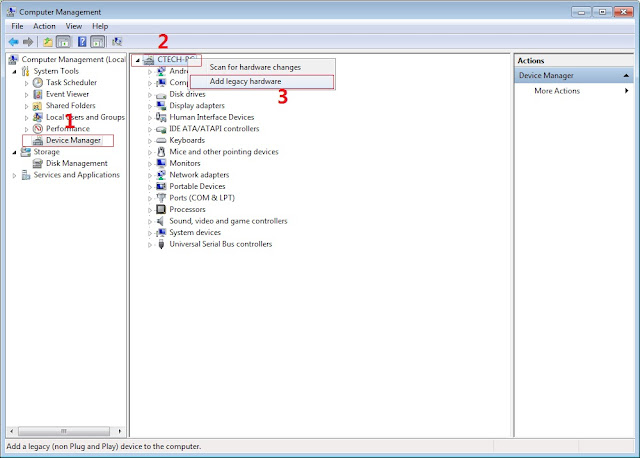
In Device Manager Right click on PC name(Right Side) and then click on Add legacy hardware as shown in image below.

Driver Installing
Now in Add Hardware Wizard click on Next » Install the Hardware that i manually select from a list (Advanced) » Show All Devices » Next » Have a Disk, Now select the any inf file from where you extracted the downloaded VCOM driver package.

Driver Location

3.  Now Click on Next and select Install this driver software anyway and wait for finishing the process.

driver installed

4.  After installation is finished then Restart your computer, That's it.
5. Open flash_tool.exe, click on the Download Tab
 Extract the downloaded Stock rom to desktop of your computer.
SPFT LOCATE SCATTER

6. Click Scatter-loading and browse for the scatter file (MT6753_Android_scatter)
7. For Bootloop only
 Make sure flashing mode is set to "Download Only" and check mark all except Preloader.
Note: If deadboot/hardbrick set "Download+Format" and check Preloader.
8. Click Download.
SPFT download

9. Turn off your phone, connect your phone to the PC and wait for the flashing to commence.
10. Green Circle image with check will show once flashing is completed. That's it!

SPFT SUCCESS

11. Disconnect your phone in USB cord then open if still bootloop then try to factory reset in recovery settings. To go in recovery mode reboot your phone hold and press power on and volume up simultaneously until recovery mode appeared.


Special Thanks:
Danielle Jhay Relox Bote for stockrom

Credits:
Danielle Jhay Relox Bote
Cherry Mobile Flare 4 Tech-Support
Maximum Team
http://Androidcribs.com
Mtkdroidtools


[ROM] Z5 Experience for CherryMobile Flare 4

[ROM] CherryMobile Flare 4 Z5 Experience @Maximu

Z5 Rom Screenshot

Z5 Rom Screenshot 2

Z5 Rom Screenshot 3

Z5 Rom Screenshot 5

Z5 Rom Screenshot 6

Z5 Rom Screenshot 7

Z5 Rom Screenshots 5

Z5 Rom Screenshot 8

Z5 Rom Screenshot 9

Z5 Rom Screenshot 10


by jonacxDGreat

What’s New?

• For Cherry Mobile Flare 4
• F4 Stock Rom Base
• DGreat Music by jonacxDGreat – Patched JetAudio Pro
• Xposed Installer
• PLDT Wifi

• Xperia Z5 Media Sounds
• Xperia Z5 Calculator
• Xperia Z5 ExperienceFlow Live wallpaper
• Xperia Z5 Photo Analyzer
• Xperia Z5 Photo Slideshow
• Xperia Z5 Wallpaper Picker
• Xperia Z5 Sound Picker
• Xperia Z5 Retaildemo App
• Xperia Z5 Phone-usage
• Xperia Z5 Home
• Xperia Z5 Album
• Xperia Z5 Videos
• Xperia Z5 Clockwidgets
• Xperia Z5 SemcClock
• Xperia Z5 Calendar
• Xperia Z5 KeyBoard
• Xperia Z5 Backup and Restore
• Xperia Z5 Clock
• Xperia Z5 Photo Editor
• Xperia Z5 Weather App
• Xperia Z5 Care
• Xperia Z5 Media Sounds
• Xperia Z5 Live Wallpaper
• Xperia Z5 Calculator
• Xperia Z5 World Clock Widget
• Xperia Z5 Top Contacts Widget
• Xperia Z5 Wallpaper
• Xperia Z5 Themes
• Xperia Z5 Movie Creator
• Xperia Z5 What's New
• Xperia Z5 Update Center

Tweaks:
Pre-installed – Pacshit Tweaks
Features:
- The ability to control every part of the Mod.
- Simplified access for new users/not willing to flash the Mod through the recovery.
- Booster Mode for better performance and battery life.
- Full memory management/Better multitasking.
- Linux kernel tweaks and improvements for better performance and battery life.
- Less lags for gamers.
- Entropy generator engine used to reduce lags.
- Zipalign apps in "/system" and apps in "/data" every 24 hours which result in less RAM usage.
- Better thermal management and less overheating.
- Sqlite optimizations and faster database access.
- Increased SD Card read-ahead cache to 2048 KB for faster SD card read and write.
- Build.prop tweaks and improvements.
- Cleans log files and tombstones at every boot.
- Many other tweaks for better performance and battery life!

Xtreme Music Mod
XTREMEMusic™ v5.0.4
About:
Better than eXtremeBeats, WORKING WITH POWERAMP and SUPPORTS ANDROID M!
The only one with HTC BOOM SOUND, Sony SFORCE SURROUND 3D and Sony DSEE-HX!
ALSO OPTIMIZED FOR DUAL SPEAKER DEVICES!
NOW WITH AN INCREDIBLE SOUND RESAMPLING! 6144khz 64bit for Headphones and 190khz 24bit for Speakers!!
SUPER EXCLUSIVE FEATURES
INCREDIBLE RESAMPLING!
Forced 6144khz 64bit for headphones and 192khz 24bit for speakers!!
Htc One M9 ported Hrman Kardon audio!
Alsa libs ported from Awesome beats give faster and better audio processing!

Features:

Beats™ Audio by Dr.Dre
More clarly sound
More stereophony sound
Clear bass
Better sound frequences yield
Sound Distortions reducer
No conflict with the equalizers!!

Pure Audio™
- Introducing the PureEQ, a new system-level component that powerfully works on the output audio part of your phone
- Updated the Beats extras libraries to the latest one
- Updated the xLoud extras libraries to the latest one
- New audio parameters in the system/etc up to 3-5-5-3-8
- Less battery consumption
- Better compatibility with other mods
- Beats peqimages updated to solo/mixr headphones
- New 320 kbps conversion algorithm
- Clear sound
- No more track noise
- Beats™ Audio by Dr.Dre
- Audio Pure™ Control not to damage your hearing
- Also compatible with the headphones that don't support audio render of 60kHz
- Where possible, arrange for the conversion of the songs (in background) below 256 kbps to 320kbps
- During playback of songs / sounds make a soft frequency scaling to reduce noise and highlight the track
- It offers more powerful and closed bass
- Efficient even with stock headphones
- Improves a lot the audio call
- Enhance the speakers for playing music without headphones in high quality

Pon Audio 3
Dolby Digital Plus
Beats Audio Libs
Sony ClearAudio and XLoud libs
SRS Processing
DTS Processing
Viper4Android
Noozxoide EIZO-rewire™ PRO
Ponified Audio => SQUEE ENGINE!!!

Samsung SoundAlive effects!
SoundAlive gives you a wide range of EQ options including 25 sound effects that enrich your listening experience for music, movies, games and even other apps. The effects are enabled by default in this MOD with a perfect balance!

Qualcomm Ported Snapdragon™ HW effects!
Qualcomm HW effects are configured parameters of audio module/feature code running on Qualcomm® Hexagon™ DSP Core contained in Qualcomm® Snapdragon™ processors. The benefit is enhanced precision, sample rate, concurrency, and reduced power consumption while retaining standard Android APIs. Qualcomm Snapdragon and Qualcomm Hexagon are products of Qualcomm Technologies, Inc

Dirac HD Audio!
Dirac offers superior technology focusing on: - Best possible sound through digital signal processing based on decades of research - Tailored solutions for your product rather than generic sound effect!

Sony Ported Z5 Sound Processing!
ClearAudio+ Has all the Sony enchantments in one!
Clear Phase optimise automatically the clarity of the speaker sound
xLOUD boost the overall speaker sound!

AwesomeBeats!
enjoy the power of a Beats Audio fully enhanced by the Team Inferno!!
HTK® audio engine
" FLY on the MUSIC "
* Powerful ALSA
* Beats audio: with lastest Beats audio engine of 2nd generation!
* DTS audio processing
* SRS audio: srs wowhd, srs truebass, srs trumemedia,...
* Dolby digital plus audio effect from HUAWEI
* Harman Kardon
* xloud
* SONY audio: clearaudio+, clearphase, surround sound...
* SFORCE SURROUND 3D from sony phone

MegaBass!
-Louder output in headphones and speaker
-Bass enchantment
-Chrispier,much clearer sound
-Not really much need for use dsp manager,althrough it cant be no harm in that

Dolby ATMOS!
Enjoy the Power of the latest dolby certified sound tecnology! with a lot of mods made for us by @worstenbrood
Dolby Atmos creates an amazing mobile headphone experience with breathtaking, moving audio—sound that flows all around you.

Surround Virtualizer creates a surround sound experience through headphones or built-in speakers.
Dialogue Enhancer ensures that every word is heard.
Volume Leveler maintains constant volume across all content and applications.
Intelligent Equalizer dynamically adjusts the audio to achieve the tone you want.
Dolby Digital Pass-Through lets you connect your device directly to a home theater for a full surround sound experience.

Lenovo's MaxxAudio  ( Installable as an OPTIONAL ADD-ON)
All the lenovo engigneers music technology experience, can be found on the Lenovo's MaxxAudio! ported for us by @ahrion
MaxxBass can extremely boost your bass without any distortion and make ypour bass very Crystalline!
MaxxTreblle Can Boost your medium ang high frequences yeld without any distortion!
MaxxVolume enchance your volume To make your music even better!


Fixes and Bugs:
Remove Xperia Music and replace by dGreatMusic

How to Install?
Reboot to custom recovery
No wiping needed
Flash zip
Reboot.....

Download Link:

Original thread:
Click Here


Special thanks:
jonacxDGreat 

Credits:
jonacxDGreat
Cherry Mobile Flare 4 Tech-Support
Danielle Jhay Relox Bote
MAXIMUM DEV


Saturday, December 26, 2015

[UPDATED] How to root Cherry Mobile Flare 4 and Install CWM recovery

How to root Cherry Mobile Flare 4
CM FLARE 4 SPECS


CM Flare 4 Specs:
5.0-inch HD IPS Display (720 x 1280 Pixel, 294 ppi)
2.5D Scratch Resistant Dragontrail Glass
Android 5.1 Lollipop OS
MediaTek MT6753 Chipset
1.3GHz Octa Core 64-bit Cortex-A53 CPU
Mali-T720 GPU
2GB of RAM
13.0 Megapixel Autofocus Main Camera with BSI Sensor and LED Flash
5.0 Megapixel Front Camera with BSI Sensor and Selfie Enhancements
16GB Internal Storage
Expandable via MicroSD
Dual SIM
4G LTE, 3G HSPA+, 2G EDGE and GPRS Networks
Wi-Fi and Wi-Fi Hotspot
Bluetooth 4.0
GPS with A-GPS
FM Radio
MicroUSB 2.0
3.5mm Audio Jack
Accelerometer
Proximity Sensor
Ambient Light Sensor
2,100mAh Battery (Removable)
₱4,999.00 Official Price in the Philippines

Warning: Rooting can void your warranty! Do it at your own risk!

Requirements:
CM flare 4
PC
USB CABLE

Download all:
(run exe file to load needed drivers)


2. Vcom drivers: .. (install sa pc)


(extract the file then copy to desktop)


 copy this CWM inside (minimal adb fastboot tool folder)
recovery copy


(copy this to your root directory of sdcard(sa labas lang ng sdcard wag sa mga folder ok)


Before you Proceed don't blame me for any damage that will happen to your device...Do it at your own risk!!!!!


Procedure:
1. first enable developer option go to setting click build number (tap 7 times) now go to developer option turn on usb debugging turn on oem unlocking
OEM UNLOCKING


2. Boot your device to Fastboot mode (hold power button and vol up) choose fastboot mode or boot into bootloader, then connect your phone to PC via USB cable. Open folder fastboot from minimal adb fastboot tool(run as administrator)
Click Run me.bat
fastboot click run me.bat

3. Type this command:

"fastboot oem unlock" 


fastboot oem unlock

Then hit Enter

don't include (")  in adb ok! Just like in the image above.
4. Then ON your device follow the instructions (choose vol up to unlock/vol down if you dont want to continue unlocking)Then wait for minimal adb to successfully unlock your bootloader (it will erase all your files and restore device to factory state)remove your device then turn it on..(on screen it will show android erasing-- after that it will boot up wait 5 to 10 minutes)skip set up wizard(skip lang ng skip)then repeat step 1.then follow the next step below


Follow this guide to flash cwm recovery on your flare s4

Procedure: 
1. How to Use Minimal ADB and Fastboot Tool to Install Custom Recovery Boot your device to Fastboot mode(hold power button and vol up) choose fastboot mode)open minimal adb fastboot tool(run as admin).
 Follow step 2. above Click Run Me.bat

2. then type this command: 
"fastboot flash recovery recovery.img"


fastboot flash recovery

Then hit Enter
(again di kasama ung "" sa command hahaha)wait untill flashing finish it will take just a secs..

3. remove your device now force it to boot to recovery hold power/volume up (choose boot to recovery) then choose install files to sdcard (flash superSu) then Boom rooted kana!
always choose fix root access when rebooting... on cwm

-----------------------------------------------------------------------------------------------------------------------------------------------
TAGALOG VERSION FOR BITOI TUTORIAL
1.Phone Procedure:Backup nyo muna ang contacts & picture sa internal memory bago umpisahan..


I.go directly to SETTINGS. In section ABOUT DEVICE, enable the developer options with eight time picks over “Build number”.(pag hindi pa naka open ang DEVELOPER OPTIONS)

II.Then in SETTINGS/DEVELOPER OPTIONS, enable the option “OEM unlocking" (pag naka off pa, Kaylangan naka ON.)

III.download nyo ito http://www.4shared.com/rar/x9kewHt8ce/Fastbootmode.html..(naka package na dyan lahat)

IV.Pag na download nyo na..extract ang Fastbootmode.rar,din magkakaroon ng folder na Fastbootmode (double click) ,e Copy nyo yung BETA-SuperSU-v2.52.zip sa SD Card.(note under SDcard na walang directory).finish!

V. Off ang Phone


2.Flash Procedure
note:wag kakabahan nakakamatay..(relax mode lang)

I. Hold Power + vol up nang sabay..hanggang sa lumabas ang logo ng FLARE 4, din saka nyo bitawan.wait a second..(paglumabas ang no command na nakahigang Android)

II. Pano pumunta sa stock recovery in a second (hold una ang power botton sunod ang vol up..count 3 saka bitawan ang VOL UP wag ang muna ang POWER..(saka nyo na bitawan ang POWER kung naka recovery na kayo..gets!!!

III.choose nyo ang Boot into bootloader (maghintay at nasa baba na naka fastboot na kayo)

IV. open ang Fastbootmode folder at e double click nyo ang RUN ME.bat (press any key...)

V. copy or type nyo ang command na ito fastboot oem unlock..din enter..sa phone nyo meron kayong mababasa..pero hint Press nyo lang ang VOL UP...it means YES
makikita nyo sa command OK at FINISH..


VI. next copy or type nyo ang command na ito fastboot flash recovery recovery.img
makikita nyo sa command 

Sending 'recovery'...........OKAY [  ]
         writing 'recovery'..OKAY [  ]
finish. total time..

V.Success..na flash nyo na ang recovery modded..

3. Rooting Procedure

I. Hold Power + vol up nang sabay..hanggang sa lumabas ang logo ng FLARE 4, din saka nyo bitawan.wait a second..then lalabas na ang recovery mode..

II. pag nasa CWM based recovery na kayo..choose lang ang install zip, din POWER hint, din choose zip from /storage/sdcard1, din wait a second..choose BETA-SuperSU-v2.52.zip..din wait a second sa pag install ng SuperSU at rooting..then reboot phone..end..

note:..hintayin nyo lang na mag boot ng normal..mejo matagal nga lang..
wag kakabahan..nakakamatay..

Download Rootchecker in Playstore to verified!
Root Success in Flare 4

Enjoy you rooted Flare 4


Note: Please give Proper Credits to androidcribs... Mahiya naman mga makapal mukha jan!...

Special Thanks:
Bitoi Da Ex for tester
Lab Obmay Layf stock recovery and boot
Credits:
Google 
HypoTurtle, Youngwe and Carliv for the CWM base i use..
AndroidCure
xposedgeek
Mtkdroid
Needrom
Xda Forum
Chainfire
Maximum