Showing posts with label Lollipop. Show all posts

Monday, February 29, 2016

How to Fix bootloop / deadboot for CM Flare S3 power (lollipop)

 How to Fix bootloop / deadboot for CM Flare S3 power (lollipop)


This tutorial on how to fix bootloop or deadboot in Flare S3 Power running in Android 5.1 version via SPFT. This is updated Stockrom  last Nov. 18, 2015. This only work in S3 power Lollipop version I'm not sure if could work to upgrade your Kitkat to Lollipop.
CM FLARE S3 POWER LOLLIPOP


Requirements:
PC/LAPTOP(WINDOWS OS)
USB CABLE
PHONE
FLARE S3 POWER stockrom (needrom)


FOR WINDOWS XP/7 -INSTALLING DRIVERS
1. Download Mediatek Driver and Extract then Install the driver for 32 or 64 bit operating system of windows 7.
Driver Choose 32 or 64 bit
2.  Before you plug your phone in PC, you need to focus in Device Manager, then plug your phone without the battery you only have approximately 5 seconds to appear MT65xx device that shows under Other devices, you need to right click it as soon as you see it.
MTK USB PORT

Then after you rightclick, click to Update driver software

3. Then choose - Browse my computer for driver software
Browse Driver

Browse the Mediatek MT65xx Preloader Driver folder

Make sure you know the version of OS to choose the right driver for your PC.

Choose your OS version, then choose if 32-bit or 64-bit for your PC.

E.G. s Win7  folder:
usb2ser_Win7.inf - if 32-bit
usb2ser_Win764.inf - if 64-bit

4. Another options, to find right driver for your phone is to open your internet while your phone is connected without the battery and automatically searching driver for your phone.

FOR WINDOWS 8/8.1/10 -INSTALLING DRIVERS
1. Download all necessary files and Enable USB Debugging mode in your phone..
2. Install Drivers USB_VCOM_Driver.rar
In Device Manager Right click on PC name(Right Side) and then click on Add legacy hardware as shown in image below.
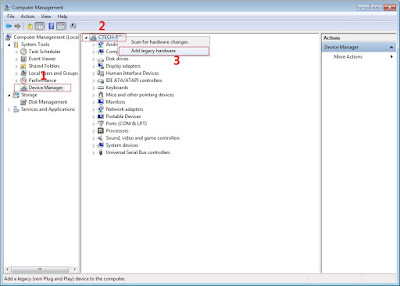
add legacy
Now in Add Hardware Wizard click on Next » Install the Hardware that i manually select from a list (Advanced) » Show All Devices » Next » Have a Disk, Now select the any inf file from where you extracted the downloaded VCOM driver package.

mediatek preloader

3.  Now Click on Next and select Install this driver software anyway and wait for finishing the process.

Install driver anyway

4.  After installation is finished then Restart your computer, That's it.
If still not success in installing driver just Disabled Driver Signature Verification
1. Go to PC Settings>General>Troubleshoot>Advanced Options>Startup Settings>Disabled Driver Signature Enforcement>Then Restart
disabled driver signature verification
Once you disabled. Then follow the procedure above to install the driver. Once success proceed to next step.

II-FLASHING VIA SPFT
1. Open flash_tool.exe, click on the Download Tab
 Extract the downloaded AFP2 stock rom to the new folder you created.
Click flash tool

2. Click Scatter-loading and browse for the scatter file (MT6592_Android_scatter)
3. For Bootloop only
 Make sure flashing mode is set to "Download Only" and check mark all except Preloader.
Note: If deadboot/hardbrick set "Download+Format" and check Preloader.
4. Click Download.
mt6592-scatter-file-spft

5. Turn off your phone, connect your phone to the PC and wait for the flashing to commence.
6. Green Circle image with check will show once flashing is completed. That's it!

SPFT SUCCESS

7. Disconnect your phone in USB cord then open if still bootloop then try to factory reset in recovery settings. To go in recovery mode reboot your phone hold and press power on and volume up simultaneously until recovery mode appeared.


Credits:
Needrom
Dess Lagnirac

Sunday, February 21, 2016

How to root CM Flare S3 Octa Lollipop and install Custom Recovery

How to root CM Flare S3 Octa Lollipop and install Custom Recovery

After an official update in Cherry Mobile Flare S3 Octa Kitkat to Lollipop version. I decided to make an update on how to root and Install Custom recovery. Hence, you can't use your custom recovery in kitkat to new update of lollipop version. I have 3 methods to root but I will teach you the most easiest way.
Root Flare S3 Octa Lollipop  Picture


Requirements:


CM Flare S3 Octa


Warning: Rooting can void your warranty!
Do it at your own risk!
FIRST METHOD
I-ROOTING
                                                   
I'm going to teach you on how to root CM Flare S3 Octa using updated Kingroot which can root even Android 5.1 or Lollipop version. 

1. Download and Install KINGROOT4.8.0.APK
2. Open Kingroot and click Optimize Now
kingroot

3. Wait to finish and click continue.
4. You can uninstall now other apps like Purify.
5. Download Rootchecker in Playstore to verify.


II-Installing Custom Recovery
Requirements:
Rashr tools
CWM (rename to recovery.img)
TWRP (rename to recovery.img)
1. Download Rashr Tool
2. Boot into Recovery
3. Locate recovery.img then flash!
Enjoy!

If Root was removed once reboot. Try to  flash this SuperSU-Beta-2.52.zip.

Here's stock recovery if you want to go back in stock recovery.


Credits:http://androidcribs.com
Kingroot
Yuweng for TWRP


SECOND METHOD
Warning: Rooting can void your warranty! Do it at your own risk!

Requirements:
CM flare S4
PC
USB CABLE

Download all:


(run exe file to load needed drivers)


2. Vcom drivers: .. (install sa pc)


(extract the file then copy to desktop)


4. CWM (rename to recovery.img)
    TWRP (rename to recovery.img)
     copy this CWM/TWRP inside (minimal adb fastbool tool folder)
recovery copy


(copy this to your root directory of sdcard(sa labas lang ng sdcard wag sa mga folder ok)


Before you Proceed don't blame me for any damage that will happen to your device...Do it at your own risk!!!!!


Procedure:
1. first enable developer option go to setting click build number (tap 7 times) now go to developer option turn on usb debugging turn on oem unlocking
OEM UNLOCKING


2. Boot your device to Fastboot mode (hold power button and vol up) choose fastboot mode or boot into bootloader, then connect your phone to PC via USB cable. Open folder fastboot from minimal adb fastboot tool(run as administrator)
Click Run me.bat
fastboot click run me.bat

3. Type this command:

"fastboot oem unlock" 


fastboot oem unlock

Then hit Enter

don't include (")  in adb ok! Just like in the image above.
4. Then ON your device follow the instructions (choose vol up to unlock/vol down if you dont want to continue unlocking)Then wait for minimal adb to successfully unlock your bootloader (it will erase all your files and restore device to factory state)remove your device then turn it on..(on screen it will show android erasing-- after that it will boot up wait 5 to 10 minutes)skip set up wizard(skip lang ng skip)then repeat step 1.then follow the next step below


Follow this guide to flash cwm recovery on your flare s4

Procedure: 
1. How to Use Minimal ADB and Fastboot Tool to Install Custom Recovery Boot your device to Fastboot mode(hold power button and vol up) choose fastboot mode)open minimal adb fastboot tool(run as admin).
 Follow step 2. above Click Run Me.bat

2. then type this command: 
"fastboot flash recovery recovery.img"


fastboot flash recovery

Then hit Enter
(again di kasama ung "" sa command hahaha)wait untill flashing finish it will take just a secs..

3. remove your device now force it to boot to recovery hold power/volume up (choose boot to recovery) then choose install files to sdcard (flash superSu) then Boom rooted kana!
always choose fix root access when rebooting... on cwm