Showing posts with label Browsing Solutions. Show all posts

Wednesday, September 21, 2016

Tested and Confirmed : How to Use Airtel Bis Plan of 6GB For N1000 on Android Devices & PC

Airtel 6GB bis plan of N1,000 has been the cheap data plan subscription for Airtel lovers to surf on their PC, Android and other devices while this was still on, Android users who did tge airtel 6GB bis plan of N1,000 regreted they did it because it's rendereduseless, because lots of people subscribed to it and they were unable used it on their
Smartphones/PC, it was limited to BB device only.


Recently I posted an article on how to subscribe to the airtel Bb data or 6gb for N1000. In this article, I explained that this BB subscription cannot be used on Android devices and I said I will update you guys when ever I found a good solution to make it work on Android devices. This trick made me remember ththe old airtel N200 for 2GB.....which works for only 2G networks And was later made to be used on 3G. for only android devices.


I'm glad to inform you that, you can now enjoy this bis plan on your Android device and even on your PC which you won't expect. It is high time you  save your N500 and use N1000 only to subscribe to 6GB data, instead of using N1,500 to get 6GB, the plan is working better on Android devices, also works for PC and other devices with help of hotspots tethering and.

But unfortunately it requires IMEI tweaking before it can work on your Android device and below are the
requirements and needs;

  • Blackberry Q 10 IMEI
  • Patience in tweaking the IMEI
  • Activation of the N1000 Airtel bis plan for 6GB


Tweak your Android phone IMEI with the Blackberry 10 IMEI below:
==> "356760051192***"  without quote ("")

What to do is Randomly add any three digits to the above provided Imei 
  • Go to this site: www.imei-number.com/imei-validation-check
  • Input the above 12 digits, e.g 356760051192
  • Add 3 digits to the already known 12 digits making 15 digits e.g 356760051192001 and validate the IMEI
  • If the random digit you choose is correct, it will display IMEI number is valid. But if the random digit is incorrect, it will display IMEI number is not valid! Or click here to tweak imei using apps to save data. If you don't like Online Imei tweaking. 
If IMEI tweaking an Imei is new to you, kindly check out this link instruction: www.horlartechgist.com/2016/06/how-and-best-way-to-tweak......


HowTo Activate the Airtel Bis Plan of N1000
  • To activate, Simply dial *431# to activate 3GB for N1,000
  • Check your bundle balance, by dialing *140#
  • Set your internet connection to the normal Airtel APN: internet.ng.airtel.com  Or click HERE for better understanding. 
For PC ( Personal Computer )  and Other Device Users

Simply activate the plan on your Android device, then you can enjoy it on any other devices via tethering.

This should serve as an alternative to formal Glo 3GB of N1000 which was discontinued few months  ago and this Airtel bis plan is ok, it charges normal when browsing.

Hope this article helps? Feel free to share this article with your friends using the Share/Like buttons. Ask
your question using the comment box below.

Friday, August 19, 2016

Solution To The Recent Etisalat 0.0k Free Unlimited Browsing Via Psiphon disconnecting And How To Use It more Than Capped 60MB

Recently, an etisalat free browsing tweak via psiphon was cracked and was discovered disconnecting anyhow. It was also said by users that is capped around 59.99MB. Is this true?, By do you know you can use more than 999MB from this free browsing tweak?


Therefore, to use more than 150MB from this free unlimited browsing tweak, follow below steps and get your VPN app counting 5GB Stat(s). 

How To Bypass The Etisalat Free Unlimited Browsing Tweak Capped 60MB

Method  1 Via New Proxy Sever
To enjoy your tweak, clear your
Psiphon data (via your data usage) and cache, then replace proxy sever: http://
ent.nxtfwd.com/s/d/etisalat_ng#openModal with ent.nxtfwd.com/s/d/etisalat_ng#openModal in new setting or use another VPN application.

Method 2 : Via ID Changer 

Download and install ID Changer Here if you don't have then lauch your psiphon handler and watch your psiphon data usage reach 60MB of data.

After 60MB usage, you'll be disconnected and once that happens, launch the downloaded ID Changer

  • Click Random
  • Then click OK then under Edit
  • Click on the icon sign that looks like "x" to generate new ID
  • After that click on that sign that looks like triangle in front of that 'x' sign to apply the generated ID
  • And then you will get the successful message.
  • Click ok and exit the ID changer and then go and reconnect the tweakware and you'll be able to use another 60MB once you finish the MB open the ID changer and click on that "X" to generate another ID and click on that triangle sign beside the 'X' sign to apply the new ID after that reconnect.
If you have any problem with this, Feel free to ask any question and I will reply you immediately. 

Wednesday, July 20, 2016

Recent glo unlimited free browsing via Psiphon is back with same settings

Now let's get it down

Glo is now growing bigger. After they released their cheapest data plan, now they are giving us a big suprise by releaseing a new free unlimited browsing settings using Vpns


Firstly, go get a new sim card (Glo),then register it, after that, out it in your phone and ON it, Confirm the registration, then open your Psiphon Pro , Syphon Shield   proNET etc ,and input this settings,👇👇👇👇


Remove Port :Untick
Proxy type: Real Host
Custom Header : X-Online-Host.
Proxy server :  Redirect.glo.com
Proxy type: Default
Real proxy sever : none
Real proxy port Port 80


Then save
Region : Netherlands


Click more settings on your VPN.


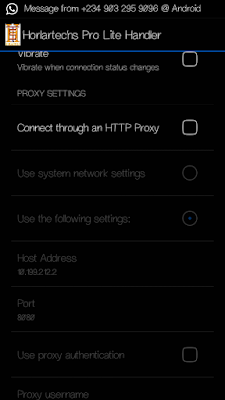
Just untick  connect through an http.

Then save and connect your phone.. The problem is that it disconnects easily

Tip: Click HERE To See how to flex with your GLO unlimited data

Airtel unlimited browsing is working with Psiphon A+ Pro

Method to flex with the latest airtel free browsing Latest psiphon A+ Pro.
Download Psiphon A+ Pro - HERE

Before you can flex with it, You should have activated your airtel Free Facebook Flex. By dialing *141# then Select 3.

Launch Your Psiphon A+Pro.apk

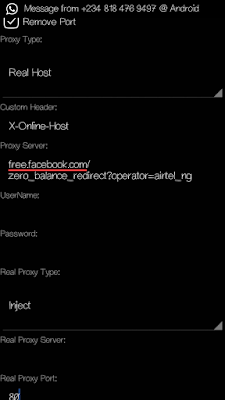
» Mark remove port
» Proxy type: Real Host
» Proxy server: free.facebook.com/
zero_balance_redirect?operator=airtel_ng
» Real Proxy Type: Inject
Real Proxy Port: 80


» Hit the Save button
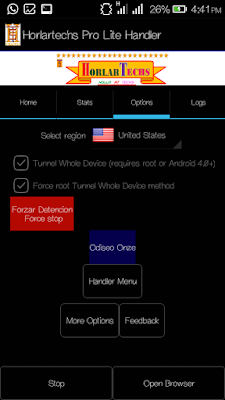
» Immediately you click save, a pop up message will appear requesting to use Tunnel whole device, just tap on the option to Tunnel Whole Device and it
will take you to the next phase
» Choose the Option Menu
» Under this Option menu, you will see Select Region , tap and select USA
» Go to your More Option settings and untick connect through HTTP Proxy


» Go back now to the main page of the Psiphon and tap the start button below, wait for few seconds for it to Connect. Then, fire up any browser and any other apps..


Enjoy it while it last.

Possible Solutions To Latest Airtel Free Unmimted Browsing Not Working On Some Devices /Sims

Many people are complaining about the recent airtel free unlimited browsing via psiphon and Tweakware. And we have made it sure that will work. The offer cannot be cancelled due to some hidden reasons.
                                    READ MORE                                                   ...................


Method to flex with the latest airtel free browsing using Horlartechs pro lite handler and Tweakware.

Before you can flex with it, You should have activated your airtel Free Facebook Flex. By dialing *141*3# or click here for more understanding.

For Horlartechs Pro Lite Handler: 

DOWNLOAD Horlartechs Pro Lite Handler - HERE

» Mark remove port
» Proxy type: Real Host
» Proxy server: free.facebook.com/
zero_balance_redirect?operator=airtel_ng
» Real Proxy Type: Inject
Real Proxy Port: 80


» Hit the Save button
» Immediately you click save, a pop up message will appear requesting to use Tunnel whole device, just tap on the option to Tunnel Whole Device and it
will take you to the next phase
» Choose the Option Menu
» Under this Option menu, you will see Select
Region , tap and select USA


» Go to your More Option settings and untick connect through HTTP Proxy
» Go back now to the main page of the Psiphon and tap the start button below, wait for few seconds for it to Connect. Then, fire up any browser and any other apps.


Enjoy it while it last.

For Horlartechs Pro Lite Handler: 

For Tweakware Settings, Click Here