Method to flex with the latest airtel free browsing Latest psiphon A+ Pro.
Download Psiphon A+ Pro - HERE
Before you can flex with it, You should have activated your airtel Free Facebook Flex. By dialing *141# then Select 3.
Launch Your Psiphon A+Pro.apk
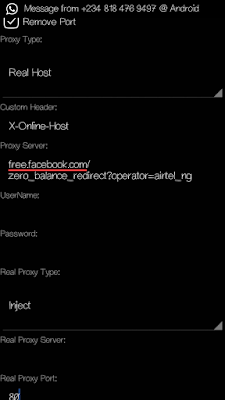
» Mark remove port
» Proxy type: Real Host
» Proxy server: free.facebook.com/
zero_balance_redirect?operator=airtel_ng
» Real Proxy Type: Inject
Real Proxy Port: 80
» Hit the Save button
» Immediately you click save, a pop up message will appear requesting to use Tunnel whole device, just tap on the option to Tunnel Whole Device and it
will take you to the next phase
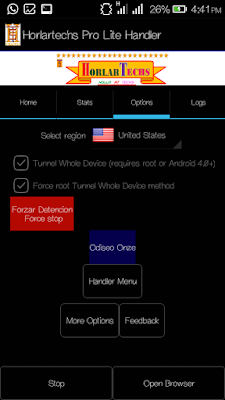
» Choose the Option Menu
» Under this Option menu, you will see Select Region , tap and select USA
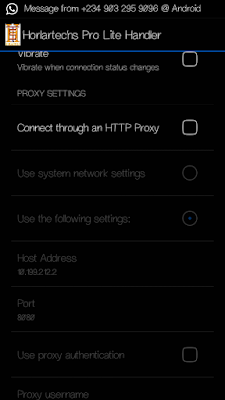
» Go to your More Option settings and untick connect through HTTP Proxy
» Go back now to the main page of the Psiphon and tap the start button below, wait for few seconds for it to Connect. Then, fire up any browser and any other apps..
Enjoy it while it last.
Showing posts with label airtel unlimited. Show all posts
Wednesday, July 20, 2016
Possible Solutions To Latest Airtel Free Unmimted Browsing Not Working On Some Devices /Sims
Many people are complaining about the recent airtel free unlimited browsing via psiphon and Tweakware. And we have made it sure that will work. The offer cannot be cancelled due to some hidden reasons.
READ MORE ...................
Method to flex with the latest airtel free browsing using Horlartechs pro lite handler and Tweakware.
Before you can flex with it, You should have activated your airtel Free Facebook Flex. By dialing *141*3# or click here for more understanding.
For Horlartechs Pro Lite Handler:
DOWNLOAD Horlartechs Pro Lite Handler - HERE
» Mark remove port
» Proxy type: Real Host
» Proxy server: free.facebook.com/
zero_balance_redirect?operator=airtel_ng
» Real Proxy Type: Inject
Real Proxy Port: 80

» Hit the Save button
» Immediately you click save, a pop up message will appear requesting to use Tunnel whole device, just tap on the option to Tunnel Whole Device and it
will take you to the next phase
» Choose the Option Menu
» Under this Option menu, you will see Select
Region , tap and select USA

» Go to your More Option settings and untick connect through HTTP Proxy
» Go back now to the main page of the Psiphon and tap the start button below, wait for few seconds for it to Connect. Then, fire up any browser and any other apps.

Enjoy it while it last.
For Horlartechs Pro Lite Handler:
READ MORE ...................
Method to flex with the latest airtel free browsing using Horlartechs pro lite handler and Tweakware.
Before you can flex with it, You should have activated your airtel Free Facebook Flex. By dialing *141*3# or click here for more understanding.
For Horlartechs Pro Lite Handler:
DOWNLOAD Horlartechs Pro Lite Handler - HERE
» Mark remove port
» Proxy type: Real Host
» Proxy server: free.facebook.com/
zero_balance_redirect?operator=airtel_ng
» Real Proxy Type: Inject
Real Proxy Port: 80

» Hit the Save button
» Immediately you click save, a pop up message will appear requesting to use Tunnel whole device, just tap on the option to Tunnel Whole Device and it
will take you to the next phase
» Choose the Option Menu
» Under this Option menu, you will see Select
Region , tap and select USA

» Go to your More Option settings and untick connect through HTTP Proxy
» Go back now to the main page of the Psiphon and tap the start button below, wait for few seconds for it to Connect. Then, fire up any browser and any other apps.

Enjoy it while it last.
For Horlartechs Pro Lite Handler:
For Tweakware Settings, Click Here
Tuesday, July 19, 2016
New Working Server For Airtel Unlimited Surfing With N0.0 Via Psiphon
I know you guys really enjoyed Airtel N0.00 tweak posted here few weeks back, before Airtel ceased the server, but I'm glad to inform you that, we had dig out another active proxy server, for you to resume your Airtel unlimited surfing without paying a dime. I would brief you guys with new Airtel free browsing setting via Psiphon Handler, Sypon Shield, Pronet or Netify VPN.
Follow the steps below accordingly and you are good to surf unlimited with Airtel Sim. Materials Needed
Take Note of This: Make sure you don't put any airtime on your Airtel sim, you must not be on any active data plan, also, clear your Psiphon or any other vpn data and cache.
Set your phone APN to the default.
Then Launch Sypon Shield or Psiphon Handler, in the handler menu:
» Mark remove port
» Proxy type: Reverse Proxy
» Proxy server: bit.ly/Airtel-wlcma
» Real Proxy Type: HTTP or Inject
Real Proxy Port: 3128
» Hit the Save button
» Immediately you click save, a pop up message will appear requesting to use Tunnel whole device, just tap on the option to Tunnel Whole Device and it will take you to the next phase
» Choose the Option Menu
» Under this Option menu, you will see Select Region, tap and select USA
» Go to your More Option settings and check“Connect through an HTTP Pro” then select“Use the following settings:” then configure as.
» Host address: 94.23.200.49
» Port: 3128
» Go back now to the main page of the Psiphon and tap the start button below, wait for few seconds for it to Connect. Then, fire up any browser and any other apps.
Here is another working setting, if the first one doesn't work for you, try this;
» Mark remove port
» Proxy type: Real Host
» Proxy server: free.facebook.com/zero_balance_redirect?operator=airtel_ng
» Real Proxy Type: Inject
Real Proxy Port: 80
» Hit the Save button
» Immediately you click save, a pop up message will appear requesting to use Tunnel whole device, just tap on the option to Tunnel Whole Device and it will take you to the next phase
» Choose the Option Menu
» Under this Option menu, you will see Select Region, tap and select USA
» Go to your More Option settings and untick connect through HTTP Proxy
» Go back now to the main page of the Psiphon and tap the start button below, wait for few seconds for it to Connect. Then, fire up any browser and any other apps. Enjoy it while it last.
5
0
1
3
0
1
0
Monday, July 18, 2016
Very Hot: Airtel free browsing with psiphon is back and better with new settings
Good Afternoon all,Do you know that airtel 0.00naira unlimited is back with new blazing settings for Psiphon,Zyphon,ProNET..etc. after they released the old free browsing using psiphon and droidvpn and kenya free sevêr browsing; now they are back with another free browsing settings using Vpns.
Requriements
• An airtel sim with 0.0k
• You need any of the following vpns : Psiphon 108 Handler, proNET, Horlartechs Vpn, Psiphon-scorpion.
Download and Launch any of those apps and configure like below.
Remove port: Untick
Proxy Type: Real Host
Proxy Sever: Free.facebook.com/zero_balance_redirect?operator=airtel_ng
Real Proxy Type: Default
Real Proxy Port : 80
Then select your region : Usa, Germany, Netherland, etc.
Go to More option.
Connect throught an Http: Don't Tick.
Settings For Horlartechs Vpn
Settings For Psiphon scorpion
Settings For Psiphon108 handler
Then go back and connect
#Happy browsing
Requriements
• An airtel sim with 0.0k
• You need any of the following vpns : Psiphon 108 Handler, proNET, Horlartechs Vpn, Psiphon-scorpion.
Download and Launch any of those apps and configure like below.
Remove port: Untick
Proxy Type: Real Host
Proxy Sever: Free.facebook.com/zero_balance_redirect?operator=airtel_ng
Real Proxy Type: Default
Real Proxy Port : 80
Then select your region : Usa, Germany, Netherland, etc.
Go to More option.
Connect throught an Http: Don't Tick.
Settings For Horlartechs Vpn
Settings For Psiphon108 handler
#Happy browsing
Friday, July 15, 2016
Latest Airtel free browsing Tricks using phisphon/droid VPN..
After airtel launches their free browsing with psiphon, now they are back with another Free browsing Cheat Latest Airtel free browsing Tricks using phisphon/droid VPN..
Latest Airtel free browsing Tricks using phisphon/droid VPN..
This free internet trick is for Airtel Indian users and it works on different tunneling apps depending on the app you love to use. This tricks works on both Android and PC and next i would be making the South African free internet post for MTN and then maybe one of these East Africancountries. So guys follow the below settings and enjoy.
Requirements:
1. An Airtel simcard
2. An Android device or a PC
3. A tunneling app
4. Ensure that you are running on zero credit balance and mb.
How to get the free Internet:
Download either Horlartech, Psiphon or droid vpn
For Droid vpn
1. Install and register
2. Open the app, login and then go to protocol
3. Select tcp as your protocol
4. Make port 80 as your tcp port(the port varies according to region, if 80 doesnt connect the use 443 etc)
5. Go to http headers and input this:
Host: airtellive.com
X-Online-Host: airtellive.com
now save and connect and enjoy free internet
For Psiphon Users:
Remove port: Tick
Make your proxy server: Buddies.airtelmoney.in
Proxy port:8080
Now save and connect..no need for custom settings
For Horlartechs vpn
Remove port: Tick
Make your proxy server: buddies.airtelmoney.in
Proxy port:8080
Now save and connect..no need for custom settings
Latest Airtel free browsing Tricks using phisphon/droid VPN..
This free internet trick is for Airtel Indian users and it works on different tunneling apps depending on the app you love to use. This tricks works on both Android and PC and next i would be making the South African free internet post for MTN and then maybe one of these East Africancountries. So guys follow the below settings and enjoy.
Requirements:
1. An Airtel simcard
2. An Android device or a PC
3. A tunneling app
4. Ensure that you are running on zero credit balance and mb.
How to get the free Internet:
Download either Horlartech, Psiphon or droid vpn
For Droid vpn
1. Install and register
2. Open the app, login and then go to protocol
3. Select tcp as your protocol
4. Make port 80 as your tcp port(the port varies according to region, if 80 doesnt connect the use 443 etc)
5. Go to http headers and input this:
Host: airtellive.com
X-Online-Host: airtellive.com
now save and connect and enjoy free internet
For Psiphon Users:
Remove port: Tick
Make your proxy server: Buddies.airtelmoney.in
Proxy port:8080
Now save and connect..no need for custom settings
Remove port: Tick
Make your proxy server: buddies.airtelmoney.in
Proxy port:8080
Now save and connect..no need for custom settings
Feel free to ask any question on this article using the comment box.
Wednesday, July 13, 2016
Latest airtel blackberry free wireless network code
This code was cracked by a very god feiend of mine gurusnizkid. He is a cheat cracker, he started cracking cheats when he was 11 yearold amdhe has always being sucessfull. If yiu wanna cintact him use the cimment box typing " i want to contact him " .
How to get free browsing on your blackberry using airtel sim.
No long story just DIAL *396#. And you will get a messge like below
BlackBerry Registration. Your handheld has been registered with the wireless network.
How to get free browsing on your blackberry using airtel sim.
No long story just DIAL *396#. And you will get a messge like below
BlackBerry Registration. Your handheld has been registered with the wireless network.
Sunday, July 10, 2016
Hot! Browse free with your airtel sim on pc and android.
After airtel released their Free Unlimited Browsing for android using,now they are back with another free unlimited browsing trick. This trick is for the Airtel users in India and it currently working in Gujarat, West Bengal, Assam Rajastham and other States though you would have to apply the settings to know if its working in your state or not.
As we all the know the trick that involves Dns free internet, we are usually given a certain amount of data to use daily but you can actually make your browsing unlimited when you upgrade to a premium account.
Requirements:
1. An Android device or a PC
2. An Airtel simcard with no data or credit balance (please a simcard that doesnt have data so as to verify thegenuineness of this trick)
3. Your Slow Dns Tunnelling app
Procedures on how to get the free internet:
1. An Android device or a PC
2. An Airtel simcard with no data or credit balance (please a simcard that doesnt have data so as to verify thegenuineness of this trick)
3. Your Slow Dns Tunnelling app
Procedures on how to get the free internet:
DOWNLOAD LINKS
» Download Tunnelguru VPN For Pc - Tunnelguru for Pc here
After Downloadung, Install the app and then launch it. Then configure settings as below
» Username : empty
» Password : empty
» Select any free server and then move to the next step
» Now input any of below ip address as your Dns:
59.144.127.117
202.56.230.7
122.160.237.201
192.168.43.1
192.168.42.129
» Pc users should also use these Dns to connect:
59.144.127.117
202.56.230.7
122.160.237.201
192.168.43.1
192.168.42.129
» Now click on connect and wait a little bit for it to connect and when it does, begin to browse and enjoy free internet!
#Happy Surfing
Saturday, July 2, 2016
Latest airtel free unlimited browsing with psiphon handler
Latest Airtel Unlimited Free Browsing July 2016
After airtel released their cheap subscription code for june and which people did not enjoy because it works with 2G networks only. And free 100mb code Now they brought out this unlimited browsing cheat for July
Launch your PSIPHON HANDLER and configure using settings below
>> proxy type : Real host
>> Proxy server : video.ng.airtellive.com

>> Real proxy type :default
>> Save and connect without any
other thing Be sure your clear
psiphon data if you have used it for
any cheat before or just go to more
options and untick connect via http

Please make sure your Account 0.0k.

Y
Wait for 20sec to connect
After airtel released their cheap subscription code for june and which people did not enjoy because it works with 2G networks only. And free 100mb code Now they brought out this unlimited browsing cheat for July
Launch your PSIPHON HANDLER and configure using settings below
>> proxy type : Real host
>> Proxy server : video.ng.airtellive.com

>> Real proxy type :default
>> Save and connect without any
other thing Be sure your clear
psiphon data if you have used it for
any cheat before or just go to more
options and untick connect via http

Please make sure your Account 0.0k.


Y
Wait for 20sec to connect
Subscribe to:
Posts (Atom)