Showing posts with label airtel. Show all posts

Wednesday, September 21, 2016

Tested and Confirmed : How to Use Airtel Bis Plan of 6GB For N1000 on Android Devices & PC

Airtel 6GB bis plan of N1,000 has been the cheap data plan subscription for Airtel lovers to surf on their PC, Android and other devices while this was still on, Android users who did tge airtel 6GB bis plan of N1,000 regreted they did it because it's rendereduseless, because lots of people subscribed to it and they were unable used it on their
Smartphones/PC, it was limited to BB device only.


Recently I posted an article on how to subscribe to the airtel Bb data or 6gb for N1000. In this article, I explained that this BB subscription cannot be used on Android devices and I said I will update you guys when ever I found a good solution to make it work on Android devices. This trick made me remember ththe old airtel N200 for 2GB.....which works for only 2G networks And was later made to be used on 3G. for only android devices.


I'm glad to inform you that, you can now enjoy this bis plan on your Android device and even on your PC which you won't expect. It is high time you  save your N500 and use N1000 only to subscribe to 6GB data, instead of using N1,500 to get 6GB, the plan is working better on Android devices, also works for PC and other devices with help of hotspots tethering and.

But unfortunately it requires IMEI tweaking before it can work on your Android device and below are the
requirements and needs;

  • Blackberry Q 10 IMEI
  • Patience in tweaking the IMEI
  • Activation of the N1000 Airtel bis plan for 6GB


Tweak your Android phone IMEI with the Blackberry 10 IMEI below:
==> "356760051192***"  without quote ("")

What to do is Randomly add any three digits to the above provided Imei 
  • Go to this site: www.imei-number.com/imei-validation-check
  • Input the above 12 digits, e.g 356760051192
  • Add 3 digits to the already known 12 digits making 15 digits e.g 356760051192001 and validate the IMEI
  • If the random digit you choose is correct, it will display IMEI number is valid. But if the random digit is incorrect, it will display IMEI number is not valid! Or click here to tweak imei using apps to save data. If you don't like Online Imei tweaking. 
If IMEI tweaking an Imei is new to you, kindly check out this link instruction: www.horlartechgist.com/2016/06/how-and-best-way-to-tweak......


HowTo Activate the Airtel Bis Plan of N1000
  • To activate, Simply dial *431# to activate 3GB for N1,000
  • Check your bundle balance, by dialing *140#
  • Set your internet connection to the normal Airtel APN: internet.ng.airtel.com  Or click HERE for better understanding. 
For PC ( Personal Computer )  and Other Device Users

Simply activate the plan on your Android device, then you can enjoy it on any other devices via tethering.

This should serve as an alternative to formal Glo 3GB of N1000 which was discontinued few months  ago and this Airtel bis plan is ok, it charges normal when browsing.

Hope this article helps? Feel free to share this article with your friends using the Share/Like buttons. Ask
your question using the comment box below.

Tested And Confirmed : How To Get Airtel Monthly BB Plan Of 6GB for N1000

Getting Airtel Monthly BB Plan Of  6GB for N1000  is better cheap subscription alternative. This Blackberry Subscription can be made on Android also but will not be amble to browse because it is a blackberry data plan. So my next update will me method to use this Blackberry subscriptions of 6GB for N1000 on Android devices.


How To Get Airtel Monthly BB Plan Of 6GB for N1000

To Get Airtel Monthly BB Plan Of  6GB for N1000 on both your android and Blackberry devices, recharge your airtel account with N1000.

Dial  *431#, then After that reply with 2  And you'll be activated for the 6GB monthly plan

After that,
For Blackberry phone : No need rebooting your phone just dial *140#  to check your data balance

For Android : reboot your android  and dial *140# to check your data balance and your 6GB standing vertically.

That's all. This Tweak is tested, confirmed and working very nice and well.

You can also resubscribe again for another 6GB for N1000 only if the former one is finished or better still, you can change data plan option to N2000 for 12GB for 2months.

Tuesday, September 13, 2016

Free Airtel 100mb And 200mb Codes For Browsing September

Airtel has arrived with their awoof strategy to lure people to buy their sim card saying they are giving salah mb for free but the just that this airtel mb giveaway has been on for a while I think last year using the code but it doesn't work for all sims it selects.


i tried it on three sims before i luckily got my own 200mb valid for 14days but i know its going to finish within a day..

HOW TO GET AIRTEL FREE  100MB/200MB

Simply dial *141*13*100# for 100mb and *141*13*200# for 200mb on your Airtel line and if you lucky You will get a Good reply from airtel claiming your free 100mb or 200mb like the Screenshot Below.


Note: Am still Saying it again, it doesn't work on all sims it selects sims to just try your luck and give feedback through
the comment box.. Thanks

Sunday, September 4, 2016

Hot! : You Can Now Get Airtel 100GB With #300 See how to

Recently airtel released the cheapest social subscription ever of 20GB for 200# and now they have released another cheapest one which gives you 100GB for 300MB.


How To Get Airtel 100GB for 300# 
Recharge your airtel line or simcard with N300 and dial  Dial *688# and reply with 1. Then check your GB with this ussd codes.

All these data works for only social media app like I explained in my article. And the trending good news is that you can accumulate it via psiphon handler VPN, Crypton, etc. So click here to view the Settings to make You accumulate your data.


Source : Spybaze

Method to flex with the recent airtel 200# for 20GB Social Data On Browsers Via Psiphon handler, Netify and Queencee Vpn

Recently, airtel introduced the cheapest social subscription of 200# for 20GB which is valid for 25days. This Cheao social subscription can only be used on social media apps as the name indicates(social data). Isn't this good you can read more about it here and also how to join the offer. And here to check the data after subscription

This 20GB of social data can be used to chat in any social media network be ut BBM, FACEBOOK, TWITTER, INSTAGRAM etc. But the major problem is that this 20GB of social data is not browsing internets but can only downloading via Operamini browser.


But the good news is that yiu now no flex with ut on all app by accumulating it with either Psiphon handler, Psiphon A+ pro, Netify, Crypton Vpn  Queencee Vpn. Follow below procedures and steps to accumulate your 20gb social data and browse unlimitedly without any rescriction.

Method to flex with the recent airtel 200# for 20GB Social Data On Browsers Via Psiphon handler, Netify and Queencee Vpn.

Recommended Vpn Apps.
The recommended VPN to power tatand accumulate this data are as listed below with link to download choice(s).


APN SETTINGS
You have to leave your apn settings in default;APN settings
Name: Horlartechgist.com
Apn: internet.ng.zain.com
Apn type:default,supl
Proxy:Not set
Port:Not set
Username: internet
Password: internet


VPN SETTINGS
Lauch your any of above recommended vpns and configure as below :

» Remove Port : Tick
» Proxy Type:Real Host
» Proxy server:nokia-s40-11-cust.opera-mini.net
» Real Proxy Type: HTTP
» Real proxy port: 80
» Hit save


» Immediately you click save, a pop up message will appear requesting to use Tunnel Whole Device, just tap on the option to Tunnel Whole Device and
it will take you to the next phase.

» Then after this, kindly go to "OPTIONS" tab then choose "UNITED STATE" as your region.
» Now, Navigate to "More Options" and untick "Connect through an http proxy".


Go back and connect.. Enjoy ur while it last. It capped 20GB it self.


If you have any problem with this setting, eint execitate to use the comment box.

Thursday, August 25, 2016

Reloaded : Airtel Trybe For Cheapest Data And Call Rates

Airtel SmartTrybe is a youth-centric offering that offers pocket-friendly call and data rates as well as irresistible freebies to customers. This package was
officially launched by Airtel on  Friday 12th August, 2016 in Lagos, Nigeria.


According to Airtel , the repackaged SmartTrybe offers 11k/sec rate to all networks in Nigeria and the cheapest cost of data bundle.

SmartTrybe Comes in Three Categories, which includes;

1. Trybe Special Data: Cheap data bundle and call rates, which gives  you 1GB of data for N500 and it will last you for one week (7 days).

2. Trybe Night Browsing: You can get 500MB data for N25 (12:00am – 5:00am), 1.5GB for N50 (12:00am-5am), and the good aspect is that you can subscribe over and over again.

3. Trybe Weekend: Airtel  SmartTryBe Weekend customers enjoy 250 MB with free 30Min calls to all  Airtel numbers

How To Opt Out From Airtel SmartTrybe

To Opt-in For SmartTrybe Package
Just dial *312# Analysis of SmartTrybe Package


1. To activate SmartTrybe, dial *312# and then select 1.
2. To subscribe for Airtel 1GB data plan, which cost N500, dial *312# and select 2.
3. To subscribe for Airtel Night Browsing,
dial*312# and select 3
4. To subscribe for Airtel Trybe Weekend Data Bundle, dial *312# and select 4.

However,  Whatever you wish to use the data bundle for, live streaming, heavy download, normal download etc. Airtel Trybe Night Browsing got you covered.

Sunday, August 21, 2016

Recall: Enjoy free unlimited facebook flex in your airtel sim card

Airtel Facebook Flex is the brand new and flexible way to use Facebook and is exclusive to Airtel, the Smartphone Network in Nigeria! You can share, like, comment, chat and update for free with Free Mode and you can switch to Data Mode to enjoy photos and videos. You can also go back to Free Mode whenever you want! With Facebook Flex, you choose when to use data. It’s easy to switch back and forth. Facebook Flex also lets you stay connected with your family and friends all the time, even with zero balance! With Free Mode, you can:

  • Chat with friends and family

• Comment on any post
• Like things you find interesting
• Share photos and videos.

With Data Mode, you can also enjoy:
• Photos and videos shared by your family and friends

To get started:
Dial *141# then select 3" Facebook Flex"


Tip: Make sure your mobile data is turned on. Then, go to www.facebook.com or open your Facebook Android app.


Not seeing Facebook Flex on your phone?
If you are not seeing facebook flex on your phone after dialing the code, go to your Facebook Menu or Bookmarks and click “Facebook Flex ” and start flexing.


Wednesday, August 17, 2016

How to chat on whatsapp unlimitedly with your airtel sim card with just 100#

You can now chat unlimitedly on whatsapp with your airtel simcard with just 100# only just recently after airtel released a free tweak for how to get free 100MB, night plans, 50# for 1.5GB, and lastly 1500# for 6GB.


Now that you can chat unlimited on whatsapp using your airtel simcard with just 50#, you will. Be able to access all your contact on whatsapp. This is just like the formal free facebook flex (FFF) Whicb they launched and was Later cracked into Cheat whereby all airtel users are using free facebook flex to access all social media app via psiphon VPN.

How Do I Browse Unlimitedly On Whatsapp. 

Very easy just get a new or an old airtairtel simcard and recharge it with just 100# and dial *948#. 
and you will start enjoying unlimited facebook till the end of the month.

What New?
The news is that, this is better than the the MTN whatsapl goodybag subscription which will just offer you 50MB for a month

Wednesday, July 20, 2016

Possible Solutions To Latest Airtel Free Unmimted Browsing Not Working On Some Devices /Sims

Many people are complaining about the recent airtel free unlimited browsing via psiphon and Tweakware. And we have made it sure that will work. The offer cannot be cancelled due to some hidden reasons.
                                    READ MORE                                                   ...................


Method to flex with the latest airtel free browsing using Horlartechs pro lite handler and Tweakware.

Before you can flex with it, You should have activated your airtel Free Facebook Flex. By dialing *141*3# or click here for more understanding.

For Horlartechs Pro Lite Handler: 

DOWNLOAD Horlartechs Pro Lite Handler - HERE

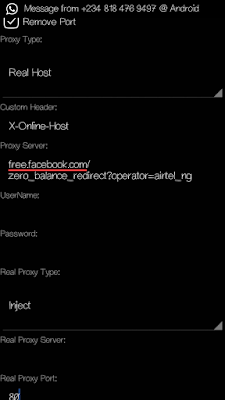
» Mark remove port
» Proxy type: Real Host
» Proxy server: free.facebook.com/
zero_balance_redirect?operator=airtel_ng
» Real Proxy Type: Inject
Real Proxy Port: 80


» Hit the Save button
» Immediately you click save, a pop up message will appear requesting to use Tunnel whole device, just tap on the option to Tunnel Whole Device and it
will take you to the next phase
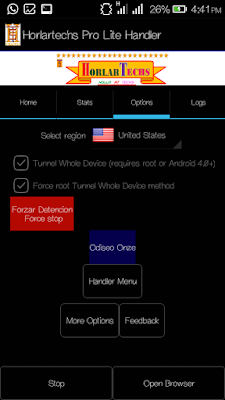
» Choose the Option Menu
» Under this Option menu, you will see Select
Region , tap and select USA


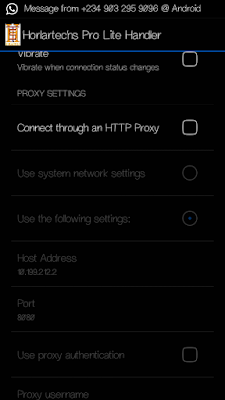
» Go to your More Option settings and untick connect through HTTP Proxy
» Go back now to the main page of the Psiphon and tap the start button below, wait for few seconds for it to Connect. Then, fire up any browser and any other apps.


Enjoy it while it last.

For Horlartechs Pro Lite Handler: 

For Tweakware Settings, Click Here 

Tuesday, July 19, 2016

New Working Server For Airtel Unlimited Surfing With N0.0 Via Psiphon

I know you guys really enjoyed Airtel N0.00 tweak posted here few weeks back, before Airtel ceased the server, but I'm glad to inform you that, we had dig out another active proxy server, for you to resume your Airtel unlimited surfing without paying a dime. I would brief you guys with new Airtel free browsing setting via Psiphon Handler, Sypon Shield, Pronet or Netify VPN.
Follow the steps below accordingly and you are good to surf unlimited with Airtel Sim.  

Materials Needed
» You can use your installed Psiphon Handler, NetifyVpn, or download Sypon Shield 

Take Note of This: Make sure you don't put any airtime on your Airtel sim, you must not be on any active data plan, also, clear your Psiphon or any other vpn data and cache.

Set your phone APN to the default.

Then Launch Sypon Shield or Psiphon Handler, in the handler menu:
» Mark remove port 
» Proxy type: Reverse Proxy
» Proxy server: bit.ly/Airtel-wlcma
» Real Proxy Type: HTTP or Inject
Real Proxy Port: 3128 
» Hit the Save button
» Immediately you click save, a pop up message will appear requesting to use Tunnel whole device, just tap on the option to Tunnel Whole Device and it will take you to the next phase 
» Choose the Option Menu
» Under this Option menu, you will see Select Region, tap and select USA

» Go to your More Option settings and checkConnect through an HTTP Pro” then select“Use the following settings:” then configure as.
» Host address: 94.23.200.49
» Port: 3128
» Go back now to the main page of the Psiphon and tap the start button below, wait for few seconds for it to Connect. Then, fire up any browser and any other apps.

Here is another working setting, if the first one doesn't work for you, try this;
» Mark remove port 
» Proxy type: Real Host
» Proxy server: free.facebook.com/zero_balance_redirect?operator=airtel_ng
» Real Proxy Type: Inject
Real Proxy Port: 80 
» Hit the Save button
» Immediately you click save, a pop up message will appear requesting to use Tunnel whole device, just tap on the option to Tunnel Whole Device and it will take you to the next phase
» Choose the Option Menu
» Under this Option menu, you will see Select Region, tap and select USA

» Go to your More Option settings and untick connect through HTTP Proxy
» Go back now to the main page of the Psiphon and tap the start button below, wait for few seconds for it to Connect. Then, fire up any browser and any other apps.
  Enjoy it while it last.

Monday, July 18, 2016

Very Hot: Airtel free browsing with psiphon is back and better with new settings

Good Afternoon all,Do you know that airtel 0.00naira unlimited is back with new blazing settings for Psiphon,Zyphon,ProNET..etc. after they released the old free browsing using psiphon and droidvpn  and kenya free sevêr browsing; now they are back with another free browsing settings using Vpns.


Requriements
• An airtel sim with 0.0k
• You need any of the following vpns : Psiphon 108 HandlerproNET, Horlartechs Vpn, Psiphon-scorpion. 

Download and Launch any of those apps and configure like below.
Remove port: Untick
Proxy Type: Real Host
Proxy Sever: Free.facebook.com/zero_balance_redirect?operator=airtel_ng
Real Proxy  Type: Default
Real Proxy Port : 80

Then select  your region : Usa, Germany, Netherland, etc.

Go to More option.
Connect throught an Http: Don't Tick.

Settings For Horlartechs Vpn


Settings For Psiphon scorpion 


Settings For Psiphon108 handler


Then go back and connect
#Happy browsing

Friday, July 15, 2016

Latest Airtel free browsing Tricks using phisphon/droid VPN..

After airtel launches their free browsing with psiphon, now they are back with another  Free browsing Cheat  Latest Airtel free browsing Tricks using phisphon/droid VPN..
Latest Airtel free browsing Tricks using phisphon/droid VPN..

This free internet trick is for Airtel Indian users and it works on different tunneling apps depending on the app you love to use. This tricks works on both Android and PC and next i would be making the South African free internet post for MTN and then maybe one of these East Africancountries. So guys follow the below settings and enjoy.

Requirements:
1. An Airtel simcard
2. An Android device or a PC
3. A tunneling app
4. Ensure that you are running on zero credit balance and mb.


How to get the free Internet:
 Download either HorlartechPsiphon or droid vpn

For Droid vpn
1. Install and register
2. Open the app, login and then go to protocol
3. Select tcp as your protocol
4. Make port 80 as your tcp port(the port varies according to region, if 80 doesnt connect the use 443 etc)
5. Go to http headers and input this:
Host: airtellive.com
X-Online-Host: airtellive.com
now save and connect and enjoy free internet


For Psiphon Users:
Remove port: Tick
Make your proxy server: Buddies.airtelmoney.in
Proxy port:8080
Now save and connect..no need for custom settings


For Horlartechs vpn
Remove port: Tick
Make your proxy server: buddies.airtelmoney.in
Proxy port:8080
Now save and connect..no need for custom settings


Feel free to ask any question on this article using the comment box. 

Thursday, July 14, 2016

Airtel launches New Night plan and Data Offer - Get 500MB for N25, 1.5GB for N50 and Lots More...

The former Airtel hourly base Night plan has been one of the best data plans which we really enjoyed for unlimited download, but I don't know who gave Airtel bad advised to increase the price of their night
plan. Mtn took the advantage and  rescue us with the night plan of 500MB for just N25 , which made lots of people forget the Airtel high price night data bundle and move on with the MTN cheap Night package.

It seems Airtel has learned from their mistake and reintroduced new night data bundle to replace the previous one. Airtel has chosen to follow the footsteps of MTN night packages by launched another Night plan which offers you :
500MB for N25, and
1.5GB for N50.

The new Airtel night plan was accompanied by Airtel 1GB for N500 which is valid for 1week and  200MB for N200 + 30Min Airtel calls weekend offer and free 15mb for 7days when you recharge with N200.

How To Activate The Offer
This plan is exclusively for SmartTRYBE users on Airtel, it means you must migrate to Airtel SmartTRYBE before you can enjoy the offer, dial *312# then reply with 1.

How To Subscribe to Airtel 1.5GB for N50, 500MB for N25 and 1GB for N500? 

» To activate the offer,
» Simply dial *312#
» For 1GB which cost N500, reply with 2 - valid for 7 days
» For 500MB which cost N25 and 1.5GB for N50, reply with 3 - Night Plan from 12am - 5am
» For 200MB which cost N200 + 30Min call, reply with 4 - Weekend: Sat and Sun.

Take Note: The call tariff on SmartTrybe features 11k/s calls charges for all national networks (N6.60K/min).

I can say that this is slightly better than the MTN Night Plan of 500MB for just N25 , because with MTN night plan every SIM card entitled to a one-time activation per night, but this Airtel night plan can be
renewed if exhausted, it means, you can resubscribe after exhausting the initial 1.5GB. In essence, you can use 3GB for N100 in just one night. When, this is ok,
but no amount of capped data can balance with the unlimited data plan, Airtel please bring back our unlimited night plan with the reasonable price.

Wednesday, July 13, 2016

Latest airtel blackberry free wireless network code

This code was cracked by a very god feiend of mine gurusnizkid. He is a cheat cracker, he started cracking cheats when he was 11 yearold amdhe has always being sucessfull. If yiu wanna cintact him use the cimment box typing " i want to contact him " . 


How to get free browsing on your blackberry using airtel sim. 

No long story just DIAL *396#.  And you will get a messge like below

BlackBerry Registration. Your handheld has been registered with the wireless network.

Sunday, July 10, 2016

Hot! Browse free with your airtel sim on pc and android.

After airtel released their Free Unlimited Browsing for android using,now they are back with another free unlimited browsing trick. This trick is for the Airtel users in India and it currently working in Gujarat, West Bengal, Assam Rajastham and other States though you would have to apply the settings to know if its working in your state or not.


As we all the know the trick that involves Dns free internet, we are usually given a certain amount of data to use daily but you can actually make your browsing unlimited when you upgrade to a premium account.

Requirements:

1. An Android device or a PC
2. An Airtel simcard with no data or credit balance (please a simcard that doesnt have data so as to verify thegenuineness of this trick)
3. Your Slow Dns Tunnelling app
Procedures on how to get the free internet:

DOWNLOAD LINKS
» Download Slow Dns VPN For Android - Slow Dns For Android 
» Download Tunnelguru VPN For Pc - Tunnelguru for Pc here

After Downloadung, Install the app and then launch it. Then configure settings as below 
»  Username : empty
»  Password : empty 
»  Select any free server and then move to the next step

» Now input any of below ip address as your Dns:
59.144.127.117
202.56.230.7 
122.160.237.201 
192.168.43.1
192.168.42.129

» Pc users should also use these Dns to connect:
59.144.127.117
202.56.230.7
122.160.237.201 
192.168.43.1
192.168.42.129

» Now click on connect and wait a little bit for it to connect and when it does, begin to browse and enjoy free internet!

#Happy Surfing 

Saturday, July 2, 2016

Latest airtel free unlimited browsing with psiphon handler

Latest Airtel Unlimited Free Browsing July 2016

After airtel  released their cheap subscription code for june and which people did not enjoy because it works with 2G networks only. And free 100mb code Now they brought out this unlimited browsing cheat for July


Launch your PSIPHON HANDLER  and configure using settings below


>> proxy type : Real host
>> Proxy server : video.ng.airtellive.com

>> Real proxy type :default


>> Save and connect without any
other thing Be sure your clear
psiphon data if you have used it for
any cheat before or just go to more
options and untick connect via http


Please make sure your Account 0.0k.


Y
Wait for 20sec to connect

Sunday, June 19, 2016

Apps to flex mtn 2gb or 4gb for 2G networks on 3G networks

When we posted the How How to flex with airtel 2gb and 4gb for 2G networks on 3G network  ut we didn't post the app. Now we are posting the app becauee some people are sti having problem with it .

APPS TO FLEX THE AIRTRL CHEAP SUBSCRIPTION.
Download script manager Here 
=> Download Turbo Changer Script 2G/3G Here 
=> Download the above file and keep it safe before
you start proceed below .
Start the 3G/4G optimizer :
Choose network speed as 12/28/7(set to max)
=> select down speed increase
=> apply the changes made .
=> Restart the device once you save the changes
=> Open the script manager
Browse the file which you downloaded (ie) 3G Turbo
script text file changer
=> Allow the Super User (grand Permission)or else
click on the Super user icon , grant permission and
run the script
Scroll up and set the setting to Fastest to get the
maximum Data Speed .
Reboot your device
=> Switch To WCDMA Mode on Setting(network)
NOTE
1. Your device must be rooted to make this trick work.
2. Reboot where ever its required .
Now you can enjoy 3g speed on our airtel 2g data plan