Showing posts with label Cherry mobile flare S4. Show all posts

Thursday, June 2, 2016

[ROM] SudaMod for Cherry Mobile Flare S4 [MT6753]

[ROM] SudaMod for Cherry Mobile Flare S4 [MT6753]

[ROM] SudaMod for Cherry Mobile Flare S4 [MT6753] Screenshots SudaMod Screenshots SudaMod Screenshots

INTRODUCTION:
SudaMod is an OS based on CyanogenMod with combining outstanding third-party code and its own speciality to make a ROM with good experience.
FEATURES:
SuperSU on status bar supports night mode
Customisable carrier size
Customisable Navbar height
Desktop gesture
Add weather lock screen
Optimised UI
Advanced info (CPU, GPU and more)
Hide status bar

And a lot more…

SHARED FOLDER LINK:

Download Link

HOW TO INSTALL:
Download all files in shared folder
Put into Sdcard
Reboot to Recovery
Backup your current Rom
Do a Full wipe (data, system)
Flash Rom
Flash Open Gapps (Pico)
Flash Dolby Atmos r6.5
Reboot


BUGS:
Emulated Storage


NOTE:
- If you want to use Xposed Installer (Framework/Modules) after first successful boot up reboot to recovery and "flash xposed-v85-sdk22-arm64.zip" then reboot.
- Use XInternalSD to be able to play games with obb data saved in internal storage.
- Use StickMount to access OTG (USB Flashdrive) via OTG Cable.
- To fix Sound Recorder simply change the file type to "wav" and then you can start recording.
- Change Backup Folder Location in Titanium Backup to restore your apps (Backup)
Navigate to Titanium Backup/Settings/Backup Folder Location/Detect/Select Storage/Sdcard1/TitaniumBackup then tap Use The Current Folder.
- Manual install all the contents of "SudaMod_Data_Apps.zip".
- For more speed:
Go to Settings> Developer Options and set
Window Animation Scale
Transition Animation Scale
Animator Duration Scale
Either Off or 0.5x; I used 0.5x.
CREDITS:
Septian Aditiya
XDA
Knight Owls Porting Assassins

Monday, May 30, 2016

[ROM] Cyanogen OS 12.1 for Cherry Mobile Flare S4 [MT6753]

[ROM] Cyanogen OS 12.1 for Cherry Mobile Flare S4 [MT6753]

[ROM] Cyanogen OS 12.1 for Cherry Mobile Flare S4 [MT6753] Screenshots [ROM] Cyanogen OS 12.1 for Cherry Mobile Flare S4 [MT6753] Screenshots [ROM] Cyanogen OS 12.1 for Cherry Mobile Flare S4 [MT6753] Screenshots

FEATURES:
All Cyanogen OS 12 Apps
Cyanogen OS Per App Themer
Boxer Email App
CM FileManager
CM Wallpapers
GalleryNext
LockClock
NextBit
Truecaller (incoming in Cyanogen OS 12.1, but I have it already here)
Screencast
CM Theme Showcase
Sound Recorder
Theme Store
Trebuchet Launcher
Google Conenctivity Services
Ambient Core (Cyanogen OS 12 Account Manager - important, dont delete it!)
Android For Work
Media Provider
Theme Chooser
MTP Enabled


SHARED FOLDER LINK:
Download Link


HOW TO INSTALL:
Download all files in shared folder
Put into Sdcard
Reboot to Recovery
Backup your current Rom
Do a Full wipe (data, system)
Flash Rom
Flash Open Gapps (Pico)
Flash Dolby Atmos r6.5
Reboot

BUGS:
Emulated Storage

NOTE:
- If you want to use Xposed Installer (Framework/Modules) after first successful boot up reboot to recovery and "flash xposed-v84-sdk22-arm64.zip" then reboot.
- Use XInternalSD to be able to play games with obb data saved in internal storage.
- Use StickMount to access OTG (USB Flashdrive) via OTG Cable.
- To fix Sound Recorder simply change the file type to "wav" and then you can start recording.
- Change Backup Folder Location in Titanium Backup to restore your apps (Backup)
Navigate to Titanium Backup/Settings/Backup Folder Location/Detect/Select Storage/Sdcard1/TitaniumBackup then tap Use The Current Folder.
- Manual install all the contents of "Cyanogen_OS_12.1_Data_Apps.zip".
- For more speed:
Go to Settings> Developer Options and set
Window Animation Scale
Transition Animation Scale
Animator Duration Scale
Either Off or 0.5x; I used 0.5x.

CREDITS:
Septian Aditiya
Knight Owls Porting Assassins


[ROM] Fira Os V2 For Cherry Mobile Flare S4 [MT6753]

[ROM] Fira Os V2 For Cherry Mobile Flare S4 [MT6753]

[ROM] Fira Os V2 For Cherry Mobile Flare S4 [MT6753] Screenshots [ROM] Fira Os V2 For Cherry Mobile Flare S4 [MT6753] Screenshots [ROM] Fira Os V2 For Cherry Mobile Flare S4 [MT6753] Screenshots

Fira Os V2 Features:
✔ FIRA Ui : Ui new user expirience that is easy to use
✔ FIRA check pulse allows user to check pulse prepaid through notification center
✔ FIRA smart call will arrange a call thats does not interfere when running application
✔ FIRA SMART Directory allows users to search addresses and phone numbers
✔ FIRA STORE is application to purchase electricity token, pulse and game vouchers
✔ FIRA Pay make it easy for online payments
✔ IMPROVES Scrolling speed
✔ Init.D Support
✔Good Battery Life
✔ Rooted With Super SU
✔ Busy Box Run Parts

✔Many More Just Explore The Rom

Star Os Rom : 
Download Link

HOW TO INSTALL:
Philz Recovery
Clear Wipe Dalvik Art Cache
Clean to Install new Rom
Flash the Rom
Cmw Recovery
Clear wipe
Data
Cache
Dalvik
Flash the Rom

Go to Settings> Developer Options and set
Window Animation Scale
Transition Animation Scale
Animator Duration Scale
Either Off or 0.5x; I used 0.5x.

CREDITS:
Knight Owls Porting Assassins
Mad Skill
And me Yow Bushkie

[ROM] Euphoria OS for Cherry Mobile Flare S4 [MT6753]

[ROM] Euphoria OS for Cherry Mobile Flare S4 [MT6753]

[ROM] Euphoria OS for Cherry Mobile Flare S4 [MT6753] Screenshots [ROM] Euphoria OS for Cherry Mobile Flare S4 [MT6753] Screenshots [ROM] Euphoria OS for Cherry Mobile Flare S4 [MT6753] Screenshots

FEATURES:
AOSP Based
Theme Chooser
Customize Quick Settings
Delta Updates
Disabled tether checking 
IME selector notification control
Advanced reboot
Adb notification control
Adb over network
Long press back to kill
CPU info overlay
Status bar brightness control
Superuser built into privacy gaurd
Battery Icons options
Option to disable lock screen carrier label
Slim heads up options
Headsup - don't show if notification drawer is visible 
HeadsUp: Swipe options
-left swipe dismiss
-right swipe put into background
-swipe down opens notification drawer and moves the notification into it
cLock widget
Notification weather panel
Disable battery saver bar color
Dialer - reverse number lookup
HSPA+ Icons
Statusbar clock and date customizations
Sound
AudioFX
Eleven
Increasing volume ringtones 
Profiles 
Increasing ring volume
Less frequent Notifications
Long Press Volume Keys to skip track
Disable volume adjust sound
Separate Ringtones & Notification volumes
Expanded Volume Panel
Navigation
Navigation bar options - Size & Hide
Left Handed nav bar in landscape
Double tap statusbar to sleep 
Wake on charge 
Keyboard cursor control
Quick settings quick pulldown
Long Press recent buttons to switch apps
Long press back to kill app
Customize clear all button location
Security
Privacy guard with advanced app opp control
Blacklist for calls and sms
Dialer
Forward lookup
Speed dial
Vibrate on answer
MMS
Updated to material theme
Pinch and zoom conversation screen
Custom vibration patterns
Quick reply
Delay message timer

Mms import & export

SHARED FOLDER LINK:


Download Link

HOW TO INSTALL:
Download all files in shared folder
Put into Sdcard
Reboot to Recovery
Backup your current Rom
Do a Full wipe (data, system)
Flash Rom
Flash Dolby Atmos r6.5
Reboot

BUGS:
Emulated Storage

NOTE:
- If you want to use Xposed Installer (Framework/Modules) after first successful boot up reboot to recovery and "flash xposed-v84-sdk22-arm64.zip" then reboot.
- Use XInternalSD to be able to play games with obb data saved in internal storage.
- To fix Sound Recorder simply change the file type to "wav" and then you can start recording.
- Change Backup Folder Location in Titanium Backup to restore your apps (Backup)
Navigate to Titanium Backup/Settings/Backup Folder Location/Detect/Select Storage/Sdcard1/TitaniumBackup then tap Use The Current Folder.
- Manual install all the contents of "Euphoria_OS_Data_Apps.zip".
- For more speed:
Go to Settings> Developer Options and set
Window Animation Scale
Transition Animation Scale
Animator Duration Scale
Either Off or 0.5x; I used 0.5x.

CREDITS:
Septian Aditiya
Sandeep Sethi
XDA
Knight Owls Porting Assassins

Saturday, May 28, 2016

[ROM] YIOS ROM for Cherry Mobile Flare S4 [MT6753]

[ROM] YIOS ROM for Cherry Mobile Flare S4 [MT6753]


YIOS Rom for Cherry Mobile Flare S4 [MT6753] Screenshots YIOS Rom for Cherry Mobile Flare S4 [MT6753] Screenshots YIOS Rom for Cherry Mobile Flare S4 [MT6753] Screenshots

FEATURES:
Automatic call recording (call open settings)
Come and go electric attribution to display and SMS
Calendar display (you can enable or disable)
Process locks, globally effective (lock and unlock operations in recent apps list)
The status bar displays speed
The status bar of virtual power button (click the lock screen, press the menu pop-up power supply)
New and fresh style icon
Adjust the settings for the two-column interface, slide show more less
The new blacklist and permission settings
Optimized dual card default account selection
Recently task list optimization, easier to operate a key clean-up
Optimization software installation, you can set the start and wake permission from the installation
Add list Animation
Increase headphone icon switch
Adjust the settings interface color
Adjust task management interface
Increase the time switch display seconds

Increased three-finger screen capture function switch


HOW TO INSTALL:
Download all files in shared folder
Put into Sdcard
Reboot to Recovery
Backup your current Rom
Do a Full wipe (data, system)
Flash Rom
Flash SuperSU v2.46
Flash Open Gapps (Pico)
Flash Dolby Atmos r6.5
Reboot
BUGS:
Emulated Storage

SHARED FOLDER LINK:
[Download ##download##]

NOTE:
- If you want to use Xposed Installer (Framework/Modules) after first successful boot up reboot to recovery and "flash xposed-v84-sdk22-arm64.zip" then reboot.
- Use XInternalSD to be able to play games with obb data saved in internal storage.
- Use StickMount to access OTG (USB Flashdrive) via OTG Cable.
- Change Backup Folder Location in Titanium Backup to restore your apps (Backup)
Navigate to Titanium Backup/Settings/Backup Folder Location/Detect/Select Storage/Sdcard1/TitaniumBackup then tap Use The Current Folder.
- Manual install all the contents of "YIOS_Data_Apps.zip".
- For more speed:
Go to Settings> Developer Options and set
Window Animation Scale
Transition Animation Scale
Animator Duration Scale

Either Off or 0.5x; I used 0.5x.

CREDITS:
Septian Aditiya
KAKA
911_Future_Maker
XDA

Knight Owls Porting Assassins


Wednesday, May 25, 2016

[ROM]CyanogenMod 12.1 Security Patch Mods v1 for Cherry Mobile Flare S4

CyanogenMod 12.1 April Security Patch Mods v1 for Cherry Mobile Flare S4  


[ROM]CyanogenMod 12.1 Security Patch Mods v1 for Cherry Mobile Flare S4 Screenshots [ROM]CyanogenMod 12.1 Security Patch Mods v1 for Cherry Mobile Flare S4 Screenshots [ROM]CyanogenMod 12.1 Security Patch Mods v1 for Cherry Mobile Flare S4 Screenshots


What`s Inside?

Dynamic System Bar
Font Chooser
Custom Carrier Label (Statusbar Carrier Label)
BUGS?

Font Chooser - “eh” word.
Custom Carrier Label - Set Text Color does not work


LINK
CM12.1 Stable Mods v1
Download Link


Instructions:
Flash via TWRP 3.0

CREDITS:

MaximumROM
Jonacx D Greyt
Danielle Jhay Relox Bote
Unknown Team
Material Android Development Team
MAaADR
Dhenz Aquino
Josiah Viola Tingzon
CyanogenMod
ROM Project 101
-Admin.D
-Pixelized.D
Cherry Mobile Flare 4 Tech-Support

Monday, May 23, 2016

[ROM]Asus Zenfone UI ROM Ported for Flare S4 Mt6753

[ROM]Asus Zen UI ROM Ported for Flare S4 Mt6753


Asus Zen Ui Rom Screenshots


Added
Removed wake delay
Ramdisk Tweaks
Init.d scripts support
Improved touch response
Memory optimizations
Gapps added
Optimized for 320dpi
No Add on added
Bugs
Emulated Storage
Asus Features
Asus Calendar
Asus Music
Asus Browser
Asus Clock
Asus Mail
Asus PC Link
Asus App Lock
Asus MiniMovie
Asus Quick Memo
Asus ZenUI Services
Asus Cloud Storage
Asus Share Link
Asus Waht’s Next
Asus Sound Recorder
Asus Do It Later
Asus Support
Asus Weather
Asus File Manager
Asus Flash Light
Asus Calculator
Asus ZenUI Launcher
Asus Live Water Live Wallpaper
Asus Photo Collage
Asus Play To
Asus Calendar

Download Link:
Patch
Click Here
ROM
Click Here
Flash Gapps
Click Here

Installation
Download the rom from the link above and copy it to your sdcard Turn off your device
Boot into TWRP/PHILZ/CWM recovery by holding volume up + power key
Wipe data, cache and system for twrp and for philz users, clean to install a new rom
Navigate to where you copied the rom zip
Select it and confirm to flash
Flash Patch
Flash Gapps
Reboot your device after flashing process is done

Credits:
Mark Herrero
Jonacx D Greyt
Danielle Jhay Relox Bote
Lino Constantino
Denielle Cruz
Mad Skill Skill
Anton Santos

Friday, May 13, 2016

How To Make Sides Of KeyBoard To Soft Touch.

Cherry Mobile Flare S4 Series


For those people who expirience Hard Touches in the sides of their keyboards this one would be applicable to you and make touches easy to touch(Soft Touches).

Steps:
1. Go to Engineering Mode By:
Dial *#*#3646633#*#*

2. Go to Hardware Testing

3. Go to Touch Screen
Engineering mode screenshot
4. Go to Settings
Touchscreen screenshot

5. Select Threshold & Set the Value to 1.
Settings Screenshot Threshold value to 1
6. Set & then Reboot

Credits to Cherry Mobile Flare S4 Plus, Flare S4, Flare 4 UNITED™ and the one who discover this trick. Thanks!


[ROM] HiOS ROM for CherryMobile Flare S4

HiOS ROM for CherryMobile Flare S4

HiOS Rom for Flare S4

HiOS Rom 2 for Flare S4

HiOS Rom 3 for Flare S4

HiOS Rom 3 for Flare S4

Rom Features:Themes Support Init.d Script Support 360Deg Screen Rotation and more...
How to flash the Rom?Reboot to recovery (Philz recommended) Wipe and format options (Clean to install a new rom) Flash/install the rom Reboot Done
HiOs Rom Download Link:


“FLASH AT YOUR OWN RISK.”

Thanks and Credits to the Following:
Mad Skill SkillMT6735/53 Porters & Helpers FB Group Ported by Lino ConstantinoMaximum (Jonacx D Greyt, Danielle Jhay Relox Bote, Mark Herrero) Maximum Dev/Port Team


Tuesday, May 3, 2016

[ROM] Two AOSP Roms for Cherry Mobile FlareS4

AOSP ROM FOR FLARE S4

AOSP ROM FOR FLARE S4 2

AOSP ROM FOR FLARE S4 3


01. AOSP/Google Rom by Jonacx D Greyt02. AOSP Rom by Mad Skill Skill
01. “AOSP/Google Rom”

AOSP/Google Rom Download Link:

02.“AOSP Rom”
Thanks and Credits to the Following:
Mad Skill SkillMTK6735-53 Helpers & Porters Facebook Group Maximum (Jonacx D Greyt, Danielle Jhay Relox Bote, Mark Herrero) Rom Ported by Lino ConstantinoMaximum Dev/Port Team
AOSP Rom Download Link:

How to flash the rom?Reboot to recovery (Philz Recommended) Wipe and Format options (Clean to Install a new rom) Flash the rom Reboot Done

#FLASH AT YOUR OWN RISK


Thanks and Credits to the following:
Rom Ported by Lino ConstantinoGoogle AOSP Team Flare4 Tech Support Facebook Group Maximum Dev/Port Team

Thursday, December 31, 2015

[TUT] How to Fix Bootloop/Hardbrick of CherryMobile Flare S4

How to Fix Bootloop/Hardbrick of CherryMobile Flare S4

Hi this tutorial teach you on how to fix bootloop or deadboot for the device CherryMobile Flare S4
with chipset of mt6753 running in Lollipop 5.1. This stockrom compiled by Denielle Cruz has already Rooted and built-in CWM. Just follow this tutorial carefully.

Cherry-Mobile-Flare-S4 bootloop


Note:  I'm not liable for any damage for your device by proceeding this you accept any liabilities.
Do it at your own risk!


Requirements:
Mediatek_Auto_Drivers.zip
USB_VCOM_Driver.rar
MediaTek_SP_Flash_Tool_V5.1532.00.zip
Rooted_Stock_Rom_with_CWM.zip

 Instructions:
1. Installing Drivers
1.) Download Mediatek Auto Installer and Extract:

Driver Auto Installer
1.1)Just choose your Operating System Win 7/Win8
driver for win7


2.) For Win 10
Install Drivers USB_VCOM_Driver.rar
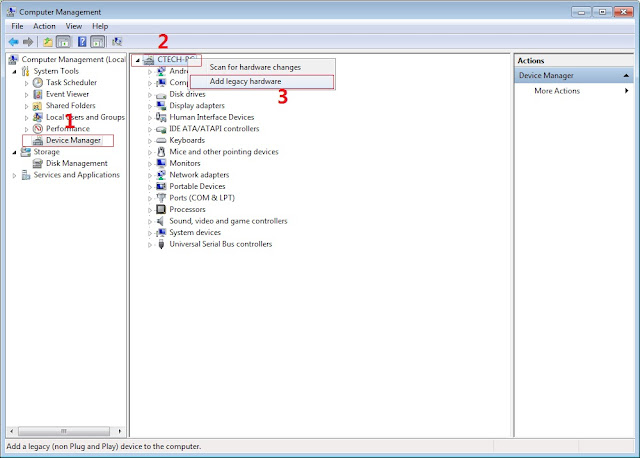
In Device Manager Right click on PC name(Right Side) and then click on Add legacy hardware as shown in image below.

Driver Installing
Now in Add Hardware Wizard click on Next » Install the Hardware that i manually select from a list (Advanced) » Show All Devices » Next » Have a Disk, Now select the any inf file from where you extracted the downloaded VCOM driver package.

Driver Location

3.  Now Click on Next and select Install this driver software anyway and wait for finishing the process.

driver installed

4.  After installation is finished then Restart your computer, That's it.
5. Open flash_tool.exe, click on the Download Tab
 Extract the downloaded Stock rom to desktop of your computer.
SPFT LOCATE SCATTER

6. Click Scatter-loading and browse for the scatter file (MT6753_Android_scatter)
7. For Bootloop only
 Make sure flashing mode is set to "Download Only" and check mark all except Preloader.
Note: If deadboot/hardbrick set "Download+Format" and check Preloader.
8. Click Download.
MT6753 SPFT

9. Turn off your phone, connect your phone to the PC and wait for the flashing to commence.
10. Green Circle image with check will show once flashing is completed. That's it!

SPFT SUCCESS

11. Disconnect your phone in USB cord then open if still bootloop then try to factory reset in recovery settings. To go in recovery mode reboot your phone hold and press power on and volume up simultaneously until recovery mode appeared.


Disclaimer:
Please give proper credits and do not reupload. Instead share this link. Thank You!


Special Thanks:
Denielle Cruz for all the files

Credits:
Denielle Cruz
http://Androidcribs.com
Mtkdroidtools