For those people who expirience Hard Touches in the sides of their keyboards this one would be applicable to you and make touches easy to touch(Soft Touches).
Steps:
1. Go to Engineering Mode By: Dial *#*#3646633#*#*
2. Go to Hardware Testing
3. Go to Touch Screen
4. Go to Settings
5. Select Threshold & Set the Value to 1.
6. Set & then Reboot
Credits to Cherry Mobile Flare S4 Plus, Flare S4, Flare 4 UNITED™ and the one who discover this trick. Thanks!
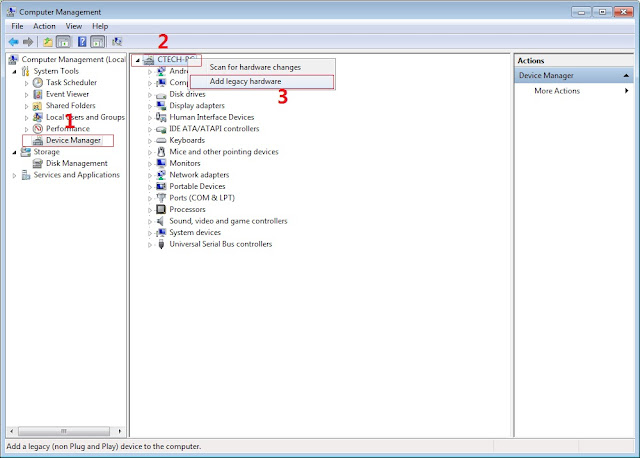
In Device Manager Right click on PC name(Right Side) and then click on Add legacy hardware as shown in image below.
Now in Add Hardware Wizard click on Next » Install the Hardware that i manually select from a list (Advanced) » Show All Devices » Next » Have a Disk, Now select the any inf file from where you extracted the downloaded VCOM driver package.
3. Now Click on Next and select Install this driver software anyway and wait for finishing the process.
4.After installation is finished then Restart your computer, That's it.
5. Open flash_tool.exe, click on the Download Tab Extract the downloaded Stock rom to desktop of your computer.
6. Click Scatter-loading and browse for the scatter file (MT6753_Android_scatter)
7. For Bootloop only Make sure flashing mode is set to "Download Only" and check mark all except Preloader. Note: If deadboot/hardbrick set "Download+Format" and check Preloader.
8. Click Download.
9. Turn off your phone, connect your phone to the PC and wait for the flashing to commence.
10. Green Circle image with check will show once flashing is completed. That's it!
11. Disconnect your phone in USB cord then open if still bootloop then try to factory reset in recovery settings. To go in recovery mode reboot your phone hold and press power on and volume up simultaneously until recovery mode appeared.
Disclaimer: Please give proper credits and do not reupload. Instead share this link. Thank You!
How to Root Cherry Mobile Flare S4 plus and Install Philz Recovery
Since we successfully rooted CM FS4 and F4 with the help of our friends and developer, I made tutorial for rooting CM Fs4 plus with same procedure in F4 and FS4. Technically, this only beta tester and I'm not sure if could work for your device. Despite some of my tutorial are tested but for now we are trial and error experiment. I also need your cooperation. Just do it at your own risk. Leave comment below if this recovery work. Thank You!
Cherry Mobile Flare S4 Plus Specifications
5.5-Inch Full HD IPS Display with OGS (1080 x 1920 Pixels, 401 ppi) Scratch Resistant DragonTrail Glass Android 5.1 Lollipop OS MediaTek MT6753 Chipset 1.3GHz Octa Core 64-bit Cortex-A53 CPU Mali-T720 GPU 3GB of RAM 16.0 Megapixel Autofocus Main Camera with BSI Sensor and LED Flash 8.0 Megapixel Front Camera 16GB Internal Storage Expandable via MicroSD Dual SIM (Micro + Nano/microSD) 4G LTE, 3G HSPA+, 2G EDGE and GPRS Networks Wi-Fi and Wi-Fi Hotspot HotKnot Bluetooth 4.0 A-GPS FM Radio USB OTG MicroUSB 2.0 3.5mm Audio Jack Accelerometer Proximity Sensor Ambient Light Sensor 153 x 76 x 6.9 mm 2,800mAh Battery (Non-removable) ₱7,999.00 Official Price
Warning: Rooting can void your warranty! Do it at your own risk!
(copy this to your root directory of sdcard(sa labas lang ng sdcard wag sa mga folder ok)
Before you Proceed don't blame me for any damage that will happen to your device...Do it at your own risk!!!!!Back up first your file and image. Can delete all during the procedure...
Method 1: VIA FASBOOT
Procedure:
1. first enable developer option go to setting click build number (tap 7 times) now go to developer option turn on usb debugging turn on oem unlocking
2. Boot your device to Fastboot mode (hold power button and vol up) choose fastboot mode or boot into bootloader), then connect your phone to PC via USB cable. Open folder fastboot from minimal adb fastboot tool(run as administrator) Click Run me.bat
3. Type this command:
"fastboot oem unlock"
Then hit Enter
don't include (") in adb ok! Just like in the image above.
4. Then ON your device follow the instructions (choose vol up to unlock/vol down if you dont want to continue unlocking)Then wait for minimal adb to successfully unlock your bootloader (it will erase all your files and restore device to factory state)remove your device then turn it on..(on screen it will show android erasing-- after that it will boot up wait 5 to 10 minutes)skip set up wizard(skip lang ng skip)then repeat step 1.then follow the next step below
Follow this guide to flash cwm recovery on your flare s4
Procedure:
1. How to Use Minimal ADB and Fastboot Tool to Install Custom Recovery Boot your device to Fastboot mode(hold power button and vol up) choose fastboot mode)open minimal adb fastboot tool(run as admin). Follow step 2. above Click Run Me.bat
2. then type this command:
"fastboot flash recovery recovery.img"
Then hit Enter
(again di kasama ung "" sa command hahaha)wait untill flashing finish it will take just a secs..
and then “fastboot reboot”.
3. remove your device now force it to boot to recovery hold power/volume up (choose boot to recovery) then choose install files to sdcard (flash superSu) then Boom rooted kana!
always choose fix root access when rebooting... on cwm
Download Rootchecker in PLaystore to verified!
Disclaimer: Please Give proper credit in my blog. Instead share this link and do not reupload my work...Some of the fb group sharing our work without saying simple "Thank you". So we plan that this particular group will stop developing rom. I just warned you!...