Showing posts with label Myphone. Show all posts

Saturday, May 28, 2016

[ROM] MIUI 7.2.3.0 Global Stable Build for MyPhone My31 mt6592 OCTACORE


[ROM] MIUI 7.2.3.0 Global Stable Build for MyPhone My31 mt6592 OCTACORE


 MIUI 7.2.3.0 Global Stable Build for MyPhone My31 mt6592 OCTACORE Screenshots

Full Changelog:
System
Optimization - Improved app signature verification (03-21)
Messaging
Optimization - Send contacts' name card style (12-25)
Optimization - Optimized starred messages' text box style (12-25)
Optimization - Supporting syncing part of SIM card messages (12-25)
Fix - When recipients exceeded one line, the upper and lower parts might get cut (12-24)
Fix - Texts in input box could not be seen when sending a message (12-25)
Lockscreen, Status Bar, Notification Bar
Fix - Status bar was black in some situations (12-08)
Fix - Sometimes status bar disappeared (12-24)
Fix - Power button menu could not be read out or operated on in Accessibility mode (01-12)
Home screen
Optimization - Home screen icons animated effects at unlocking (12-08)
Fix - Home screen crashed in some situations. (12-02)
Fix - Sometimes daily lockscreen did not work (01-06)
Fix - It asked to change folder name when first open the folder in Mi Space mode after rebooting (01-12)
Fix - Issue with lost Home screen icons after they've been successfully restored and device rebooted (01-25)
Music
Optimization - In random playing mode, pressing 'Play all' in song list will not always start playing from the first song in the list (12-15)
Backup
Optimization - New design for Mi Mover (01-25)
Weather
New - Brand new Weather app. Added 24 hours forecast (12-11)
Settings
Fix - Problem with interruption of unlock settings while entering a password (03-29)
Fix - Backups couldn't be created in some cases (03-29)
Mi Drop
Fix - Sometimes WiFi did not connect after files were sent (12-10)
Cleaner
New - Support adding apps to exception list in one press (11-30)
New - New version of Deep clean. Added available storage space (12-15)
New - New version of photos cleaning feature. Added duplicate photos/accidental photos/under and overexposed/screenshots sections (12-15)
New - Added 'save the sharpest photos' option when cleaning duplicate photos (12-15)
New - Deep clean supports cleaning APK. files (01-05)
New - Deep clean supports managing videos (01-05)
Optimization - Logic of defining rarely used apps (12-15)
Fix - Errors in calculating sizes of deep clean big files (01-05)
Mi Cloud

New - Added account lock after flashing phone in Find device. Avoid risks of lost phone being used by others (12-22)

Download Link:
Click Here

INSTALLATION:
USE TWRP RECOVERY
- boot to recovery
- backup current rom
- wipe data type yes
-Install zip
-flash the rom
- Reboot
- Done!!!
PHILZ
-boot to recovery
-clean to install new rom
-flash the rom
-reboot
-done
CTR/CWM
-boot to recovery
-wipe pre flash all
-flash the rom
reboot

-done

Credits:
MIUI
Knight Owls Porting Assassins

-arnel

Monday, May 16, 2016

How to fix bootloop Myphone My36 via Wiko Fever Firmware

How to fix bootloop Myphone My36 via Wiko Fever Firmware


This tutorial teach you on how to fix bootloop and deadboot for Myphone My36. Since we still no available stockrom for My36 we will use Wiko Fever firmware which OTA of this phone. This already tested of our members. To flash this firmware you need to download all needed requirements. Just follow my instructions carefully.
How to fix bootloop Myphone My36


Requirements:
WIKO FEVER STOCKROM
PC/LAPTOP(WINDOWS OS)
USB CABLE
PHONE


FOR WINDOWS XP/7 -INSTALLING DRIVERS
1. Download Mediatek Driver and Extract then Install the driver for 32 or 64 bit operating system of windows 7.
Driver Choose 32 or 64 bit
2.  Before you plug your phone in PC, you need to focus in Device Manager, then plug your phone without the battery you only have approximately 5 seconds to appear MT65xx device that shows under Other devices, you need to right click it as soon as you see it.
MTK USB PORT

Then after you rightclick, click to Update driver software

3. Then choose - Browse my computer for driver software
Browse Driver

Browse the Mediatek MT65xx Preloader Driver folder

Make sure you know the version of OS to choose the right driver for your PC.

Choose your OS version, then choose if 32-bit or 64-bit for your PC.

E.G. s Win7  folder:
usb2ser_Win7.inf - if 32-bit
usb2ser_Win764.inf - if 64-bit

4. Another options, to find right driver for your phone is to open your internet while your phone is connected without the battery and automatically searching driver for your phone.

FOR WINDOWS 8/8.1/10 -INSTALLING DRIVERS
1. Download all necessary files and Enable USB Debugging mode in your phone..
2. Install Drivers USB_VCOM_Driver.rar
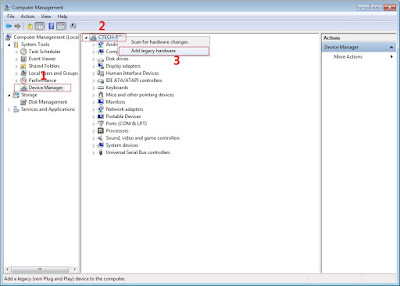
In Device Manager Right click on PC name(Right Side) and then click on Add legacy hardware as shown in image below.

add legacy
Now in Add Hardware Wizard click on Next » Install the Hardware that i manually select from a list (Advanced) » Show All Devices » Next » Have a Disk, Now select the any inf file from where you extracted the downloaded VCOM driver package.

mediatek preloader

3.  Now Click on Next and select Install this driver software anyway and wait for finishing the process.

Install driver anyway

4.  After installation is finished then Restart your computer, That's it.
If still not success in installing driver just Disabled Driver Signature Verification
1. Go to PC Settings>General>Troubleshoot>Advanced Options>Startup Settings>Disabled Driver Signature Enforcement>Then Restart
disabled driver signature verification
Once you disabled. Then follow the procedure above to install the driver. Once success proceed to next step.
5. Download SP_Flash_Tool_v5.1352.01.rar and extract then click flash_ tool to open
Click Flash tool

6. Click Scatter_loading and open your scatter file like image below(I'm using mt6572 scatter File)

Click Scatter Loading


7. Check all except preloader. (If your device is hardbrick/deadboot apply check in preloader)

Uncheck Preloader


8. Click download
Click Download


9. Wait until green circle appear

SPFT SUCCESS GREEN CIRCLE


Remove your phone to usb cable then insert your battery and On your android phone..Enjoy!

Note: If not reboot try factory reset in recovery mode of your phone.

Saturday, May 14, 2016

How to fix bootloop for Myphone My32L

How to fix bootloop for Myphone My32L

This tutorial teach you how to fix bootloop or deadboot Myphone My32L. This firmware or stockrom of My32L need to flash via SPFT using your working USB cable and PC. Just follow our instructions carefully.
How to fix bootloop for Myphone My32L


Requirements:
STOCKROM
PC/LAPTOP(WINDOWS OS)
USB CABLE
PHONE


FOR WINDOWS XP/7 -INSTALLING DRIVERS
1. Download Mediatek Driver and Extract then Install the driver for 32 or 64 bit operating system of windows 7.
Driver Choose 32 or 64 bit
2.  Before you plug your phone in PC, you need to focus in Device Manager, then plug your phone without the battery you only have approximately 5 seconds to appear MT65xx device that shows under Other devices, you need to right click it as soon as you see it.
MTK USB PORT

Then after you rightclick, click to Update driver software

3. Then choose - Browse my computer for driver software
Browse Driver

Browse the Mediatek MT65xx Preloader Driver folder

Make sure you know the version of OS to choose the right driver for your PC.

Choose your OS version, then choose if 32-bit or 64-bit for your PC.

E.G. s Win7  folder:
usb2ser_Win7.inf - if 32-bit
usb2ser_Win764.inf - if 64-bit

4. Another options, to find right driver for your phone is to open your internet while your phone is connected without the battery and automatically searching driver for your phone.

FOR WINDOWS 8/8.1/10 -INSTALLING DRIVERS
1. Download all necessary files and Enable USB Debugging mode in your phone..
2. Install Drivers USB_VCOM_Driver.rar
In Device Manager Right click on PC name(Right Side) and then click on Add legacy hardware as shown in image below.

add legacy
Now in Add Hardware Wizard click on Next » Install the Hardware that i manually select from a list (Advanced) » Show All Devices » Next » Have a Disk, Now select the any inf file from where you extracted the downloaded VCOM driver package.

mediatek preloader

3.  Now Click on Next and select Install this driver software anyway and wait for finishing the process.

Install driver anyway

4.  After installation is finished then Restart your computer, That's it.
If still not success in installing driver just Disabled Driver Signature Verification
1. Go to PC Settings>General>Troubleshoot>Advanced Options>Startup Settings>Disabled Driver Signature Enforcement>Then Restart
disabled driver signature verification
Once you disabled. Then follow the procedure above to install the driver. Once success proceed to next step.
5. Download SP_Flash_Tool_v5.1352.01.rar and extract then click flash_ tool to open
Click Flash tool

6. Click Scatter_loading and open your scatter file like image below(I'm using mt6572 scatter File)

Click Scatter Loading


7. Check all except preloader. (If your device is hardbrick/deadboot apply check in preloader)

Uncheck Preloader


8. Click download
Click Download


9. Wait until green circle appear

SPFT SUCCESS GREEN CIRCLE


Remove your phone to usb cable then insert your battery and On your android phone..Enjoy!

Note: If not reboot try factory reset in recovery mode of your phone.


Sunday, February 14, 2016

How to flash stock rom Myphone My28s and openline using PC

How to flash stock rom Myphone My28s and openline using PC
Myphone Flash Stock Rom


Download all: 
1.FirmwareMy28s: Click Here
Mirror Link(NO PASSWORD)
2. Upgrade Download Tool: Click Here
3. SPRD NPI USBDriver: Click Here


1st password: PM me sa Password

2nd password: Salamat po


HOW TO FLASH?

  1. Open SPRD NPI USB Driver > Production Line Version >Choose "amd64" if you're using 64 bits * choose x86 if you're using 32 bits (After this steps install the driver that compatible in your PC)
  2. Open Upgrade Download (You can locate it in the SPRD Upgrade Tool Folder)
  3. After you open Upgrade Download, Click LOAD PACKET
  4. Then find the extracted folder ofMyPhone_My28s_Openline_Firmware_v1 and click the pac file (Wait for a few seconds until the pac file will load)
  5. After the pac file will load, click the START DOWNLOADING (Parang Arrow)
  6. REMOVE your battery and insert it back
  7. Hold Vol + and Vol - together, then connect the USB Cable into the PC.
  8. If you can see "IN PROGRESS" in the Upgrade Download Tool, you can release the Vol + & -
  9. It will flash and just wait for a few minutes (It takes 3 - 5 minutes, so be patience)
  10. When the flashing is "PASSED" It means you made it :D
  11. Remove your device in PC.
  12. Remove Battery and Insert it Back
  13. Go to RECOVERY MODE (Hold Power Button + Volume UP, Dapat una mo ma hold yung power button then hold mo din agad yung volume up. Take note, dapat nka hold na power at yung volume up sa hindi pa lalabas yung mapa or hindi pa mag vibrate yung device mo)
  14. Do a Wipe Data/Factory Reset (After wiping, please REBOOT your device)
  15. Wait 5-10 minutes to boot your device. (1st time boot, matagal talaga pero 2nd time and so on hindi na)
  16. *Then if you're in SYSTEM now, may Kingroot na yan na naka install (Pre-Rooted kasi yung firmware kaya may root access kana agad. Open mo lang yung Kingroot, pwede ka na din mag debloat ng apps)

CREDITS to all Team28Devs
Klark Luis Peralta
Popoy Fernandez
Risty John Ababa
MyPhone My28 & MyPhone My28s (OFFICIAL GROUP)

How to Flash Stock ROM and Openline My28 (.pac flashing method) using PC

How to Flash Stock ROM and Openline My28 (.pac flashing method) using PC

My28 STOCK ROM AND OPENLINE


Download this firmware: 
1. MyPhone My28 Smartlock (Openline) Firmware by Team28DEVS

2. Upgrade Download Tools:
Click Here

3. SPRD NPI USB Driver:
Click Here

AFTER YOU DOWNLOAD ALL THIS LINK, EXTRACT IT USING WINRAR.
=========================================================================
HOW TO FLASH?


  1. Open SPRD NPI USB Driver > Production Line Version >Choose "amd64" if you're using 64 bits * choose x86 if you're using 32 bits (After this steps install the driver that compatible in your PC)
  2. Open Upgrade Download (You can locate it in the SPRD Upgrade Tool Folder)
  3. After you open Upgrade Download, Click LOAD PACKET
  4. Then find the extracted folder of MyPhone My28 Smartlock (Openline) Firmware by Team28DEVS and click the pac file (Wait for a few seconds until the pac file will load)
  5. After the pac file will load, click the START DOWNLOADING (Parang Arrow)
  6. REMOVE your battery and insert it back
  7. Hold Vol + and Vol - together, then connect the USB Cable into the PC.
  8. If you can see "IN PROGRESS" in the Upgrade Download Tool, you can release the Vol + & -
  9. It will flash and just wait for a few minutes (It takes 3 - 5 minutes, so be patience)
  10. When the flashing is "PASSED" It means you made it :D
  11. Remove your unit in PC and Manually Reboot your device.
  12. Wait 5-10 minutes to boot your device. (1st time boot, matagal talaga pero 2nd time and so on hindi na)
  13. Then if you're in SYSTEM now, try to Install Kingroot Apk (Pre-Rooted kasi yung firmware kaya may root access kana agad kung ma install mo yung Kingroot)
  14. Problem in INSERT SIM? (Reboot lang ng reboot hanggang sa babalik yung signal, bugged po kasi yan ng My28, at hindi lang ang My28 ang may problema na ganyan pati din sa My27 ganyan din so salamat sa pag intindi)

============================================================
Watch Video in Youtube for Tutorial

N O T E: This firmware is not applicable for My28s. Hindi namin alam kung working ba sya sa My28s or hindi, baka kasi ma ano pa yung unit niyo, kaya TAKE RISK kung gusto niyo e try. Basta yung suggest namin mga Team28Devs is don't try it muna kasi di pa namin subok yan. (TRY IT IN YOUR OWN RISK)

============================================================

Credits to all my CO - TEAM28DEVS
 Risty John Ababa
MyPhone My28 & MyPhone My28s (OFFICIAL GROUP)

How to fix Low Signal for My28 and My28s & Unlocking/Openlining via Terminal Method using Phone

NOTE: APPLICABLE ETO SA MGA NAKAPAG OPENLINE USING FIRMWARE AT PWEDE DIN ETO GAWIN PANG OPENLINE.


myphone My28 openline

  • DO THIS AT YOUR OWN RISK 

NOTE: YOU MUST ROOT YOUR DEVICE BEFORE DOING THIS, USE KINGROOT.

  • Bago ang lahat, mag-backup muna ng inyong IMEI. Just in case na mabago ang IMEI niyo.
 1. Open Dialer and dial this codes *#*#83781#*#* (Engineer Mode)2. Go to Telephony --> Set IMEI3. Copy your Sim1 and Sim2 IMEI on a piece of paper. (Kung nagbago yung IMEI niyo at nawala yung box, pwede niyo din e check yung default IMEI niyo sa likod ng phone, tanggalin lang ang battery at makikita niyo yung IMEI ng Sim1 and Sim2)  


=========================================================

  • REQUIREMENTS
  1. Terminal Emulator (download on Playstore)
  2. FIX OPENLINE.rar
  3. Common Sense
  • After downloading FIX OPENLINE.rar, extract it using RAR, 7zip, etc.. 
  • Open the extracted folder and you can see, wcnfixnv1.imgwcnfixnv2.imgwfixnv1.imgwfixnv2.img.
  • Copy those 4 files and put it in the root of your SD Card. (Wag niyo silang ilagay sa kahit anong folder, MALIWANAG?)


=========================================================

FOLLOW THIS SIMPLE STEPS (COMMON SENSE BARELY NEEDED)
  1. Open Terminal Emulator
  2. Type su (after press enter may lalabas na "#" sign)
  3. Type ( dd if=sdcard/wfixnv1.img of=dev/block/mmcblk0p5 ) tapos enter, may lalabas na message at babalik yung "#" sign 
    Terminal emulator step 2 and 3
  4. Type ( dd if=sdcard/wfixnv2.img of=dev/block/mmcblk0p6 ) tapos enter, may lalabas na message at babalik yung "#" sign
    Terminal emulator step 4
  5. Type ( dd if=sdcard/wcnfixnv1.img of=dev/block/mmcblk0p10) tapos enter, may lalabas na message at babalik yung "#" sign
    Terminal emulator step 5
  6. Type ( dd if=sdcard/wcnfixnv2.img of=dev/block/mmcblk0p11) tapos enter, may lalabas na message at babalik yung "#" sign
    Terminal emulator step 6 and 7
  7. Type ( reboot ) tapos enter para mag reboot yung device.


  8. Check your IMEI
  8.1 Open Dialer and dial this codes *#06#
Kung nabago ang inyong IMEI, then Go back to Engineer Mode and restore your original IMEI


NOTE: APPLICABLE ETO SA MGA NAKAPAG OPENLINE USING FIRMWARE AT PWEDE DIN ETO GAWIN PANG OPENLINE.


HIT LIKE & THANKS :D


#Team28Devs

Credits:
MyPhone My28 & MyPhone My28s (OFFICIAL GROUP)